

Salesforce Data Integration: How to Sync Data Across Systems
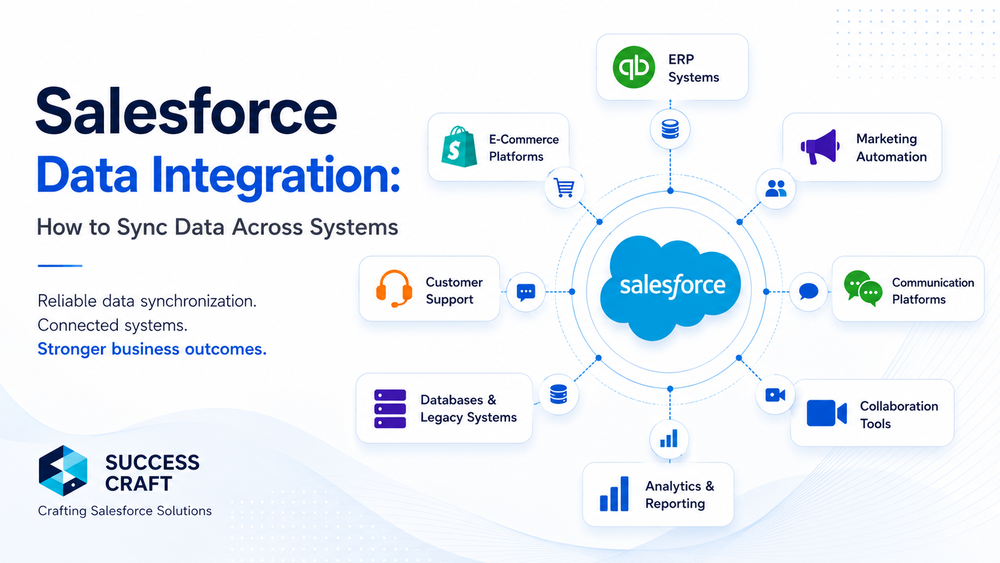
Salesforce data integration has become essential for modern businesses that operate across multiple platforms and applications. Customer data constantly moves between CRMs, ERP systems, marketing automation tools, support platforms, e-commerce systems, communication applications, and internal databases. Without reliable synchronization, these systems gradually become inconsistent, creating operational inefficiencies, reporting inaccuracies, and poor customer experiences.
Organizations no longer need Salesforce to function as an isolated CRM. They need it to operate as the central layer of a connected business ecosystem.
Disconnected systems often create:
- duplicate customer records;
- outdated information across departments;
- inconsistent reporting;
- broken workflows and automations;
- synchronization delays;
- operational bottlenecks.
As businesses scale, integration complexity grows significantly. New systems, evolving APIs, additional automations, and increasing data volumes gradually introduce synchronization drift and operational instability.
Reliable integration architecture helps organizations:
- maintain data consistency;
- improve operational visibility;
- automate business workflows;
- reduce manual work;
- support scalable enterprise operations.
At the same time, successful integrations are not only about connecting APIs. Long-term reliability depends on architecture, synchronization strategy, observability, monitoring, governance, and scalability.
In this guide, we explore:
- how Salesforce data integration works;
- common synchronization approaches;
- enterprise integration patterns;
- major integration challenges;
- best practices for scalable and reliable synchronization.
What Is Salesforce Data Integration
Definition and Core Purpose
Salesforce data integration is the process of connecting Salesforce with external systems to synchronize data, automate workflows, and maintain operational consistency across business applications.
In practice, integration allows organizations to exchange information between Salesforce and:
- ERP systems;
- marketing automation platforms;
- customer support tools;
- e-commerce systems;
- internal databases;
- third-party business applications.
The purpose of integration is not simply to transfer data between systems. The goal is to create a scalable operational ecosystem where information remains accurate, synchronized, and accessible across departments.
For example:
- customer data from an ERP can synchronize with Salesforce;
- support platforms can share case history with sales teams;
- payment systems can automatically update billing information;
- marketing tools can synchronize leads and engagement activity.
It is also important to distinguish integration from migration.
A migration is typically a one-time transfer of information from one system to another. Integration focuses on continuous synchronization and long-term operational consistency between connected systems.
Typical Systems Integrated with Salesforce
Modern Salesforce environments commonly integrate with multiple operational systems.
ERP Systems
ERP integrations synchronize:
- invoices;
- financial records;
- orders;
- inventory data;
- customer accounts.
Examples include:
- SAP;
- Oracle ERP;
- NetSuite;
- Microsoft Dynamics.
Marketing Automation Platforms
Marketing integrations synchronize:
- campaigns;
- lead activity;
- segmentation data;
- customer engagement metrics.
Popular platforms include:
- HubSpot;
- Mailchimp;
- Marketo;
- ActiveCampaign.
Customer Support Tools
Support integrations help unify:
- support tickets;
- communication history;
- customer interactions;
- service operations.
Examples include:
- Zendesk;
- Freshdesk;
- Intercom.
E-Commerce Systems
E-commerce integrations synchronize:
- products;
- customers;
- carts;
- payments;
- order statuses.
Common platforms:
- Shopify;
- Magento;
- WooCommerce.
Internal Databases and Third-Party Applications
Enterprise organizations also frequently integrate Salesforce with:
- proprietary systems;
- analytics platforms;
- middleware layers;
- legacy applications;
- internal APIs.
Why Salesforce Data Synchronization Matters
Business Impact of Poor Synchronization
Poor synchronization creates operational friction across the entire organization.
Duplicate Records
When systems fail to synchronize correctly, duplicate accounts, contacts, and leads begin to appear across platforms. This affects reporting accuracy and disrupts sales operations.
Outdated Customer Information
Customer information often becomes inconsistent between systems.
For example:
- sales teams see one version of customer data;
- support teams see another;
- marketing platforms continue using outdated information.
This directly affects customer experience and internal efficiency.
Reporting Inconsistencies
Disconnected systems generate unreliable analytics and reporting.
Organizations lose visibility into:
- pipeline performance;
- revenue attribution;
- operational KPIs;
- customer lifecycle metrics.
Broken Automation and Workflows
Modern businesses rely heavily on automation. Synchronization failures can break:
- lead routing;
- approval processes;
- customer onboarding;
- notifications;
- support escalations.
Benefits of Reliable Salesforce Data Integration
Well-designed integrations provide long-term operational advantages.
Single Source of Truth
Reliable synchronization helps organizations maintain consistent customer data across systems.
Better Customer Experience
Teams gain access to accurate and up-to-date information, improving customer interactions and response quality.
Improved Operational Efficiency
Integrated systems reduce:
- repetitive manual work;
- data entry overhead;
- operational delays;
- synchronization errors.
More Accurate Reporting and Analytics
Consistent data improves:
- forecasting;
- reporting reliability;
- operational visibility;
- business decision-making.
Salesforce Data Integration Approaches
Real-Time Salesforce Data Synchronization
Real-time synchronization updates systems immediately after changes occur.
For example:
- a customer updates billing information;
- Salesforce instantly synchronizes the change with ERP and support systems.
Best Use Cases
Real-time synchronization works well for:
- customer-facing operations;
- payment systems;
- support environments;
- communication workflows;
- inventory visibility.
Advantages
Benefits include:
- immediate consistency;
- reduced delays;
- better customer experience;
- faster operational processes.
Limitations
However, real-time integrations also increase complexity:
- API consumption grows;
- dependency chains become tighter;
- system failures propagate faster;
- operational monitoring becomes more important.
As environments scale, poorly designed real-time integrations often become unstable.
Batch Salesforce Data Synchronization
Batch synchronization processes data at scheduled intervals.
Typical synchronization schedules include:
- every few minutes;
- hourly;
- nightly.
Common Use Cases
Batch synchronization is commonly used for:
- reporting systems;
- analytics platforms;
- large data transfers;
- non-critical updates.
Advantages
Benefits include:
- reduced API pressure;
- easier scalability;
- lower infrastructure costs;
- better handling of large datasets.
Limitations
The primary tradeoff is latency. Systems may temporarily contain outdated information between synchronization cycles.
Event-Driven Salesforce Data Integration
Event-driven integration uses asynchronous architecture to synchronize systems based on events rather than direct requests.
Examples include:
- Salesforce Platform Events;
- message queues;
- event buses.
Official Salesforce documentation:
https://developer.salesforce.com/docs/platform/platform-events/overview
Scalability Advantages
Event-driven architectures:
- reduce direct system dependencies;
- improve scalability;
- support distributed systems;
- handle operational spikes more effectively.
Enterprise Use Cases
This approach is especially valuable in:
- enterprise ecosystems;
- high-volume operational environments;
- multi-system architectures;
- asynchronous business workflows.
Key Challenges in Salesforce Data Integration
Salesforce Data Consistency Problems
Duplicate Records
Without proper synchronization rules, multiple systems may create duplicate records.
Conflicting Updates
Two systems may update the same customer information simultaneously, creating synchronization conflicts.
Data Mapping Issues
Different systems often use:
- different field structures;
- validation rules;
- naming conventions;
- object relationships.
This significantly increases integration complexity.
Synchronization Drift
Many integrations work reliably during initial implementation but become unstable over time.
As systems evolve:
- APIs change;
- workflows expand;
- new automations appear;
- business logic becomes more complex.
Without governance and monitoring, synchronization drift gradually creates inconsistencies across systems.
Salesforce API and Performance Limitations
Salesforce integrations must operate within API and governor limits.
Official Salesforce REST API documentation:
https://developer.salesforce.com/docs/atlas.en-us.api_rest.meta/api_rest/intro_rest_api.htm
Common Challenges
Organizations frequently encounter:
- API rate limits;
- large payload processing;
- synchronization latency;
- failed transactions;
- timeout handling.
As integrations scale, API optimization becomes increasingly important.
API Optimization Strategies
To improve scalability and performance, organizations should:
- reduce unnecessary API calls;
- use filtering and selective synchronization;
- process records asynchronously;
- use batching where appropriate;
- leverage Bulk APIs for large datasets.
Official Salesforce Bulk API documentation:
https://developer.salesforce.com/docs/atlas.en-us.api_asynch.meta/api_asynch/
Salesforce Integration Security and Authentication
Security is a critical part of enterprise integration architecture.
OAuth Authentication
Most modern Salesforce integrations rely on OAuth authentication flows.
Token Management
Integrations must securely manage:
- access tokens;
- refresh tokens;
- credential rotation.
Secure API Communication
Organizations should implement:
- encrypted communication;
- least-privilege access;
- secure authentication strategies.
Related article:
Update Salesforce Integrations with OAuth Security
https://success-craft.com/blog/update-salesforce-integrations-oauth-security/
Best Practices for Salesforce Data Integration
Design a Salesforce Integration Architecture First
One of the most common mistakes is building integrations before defining architecture.
Reliable integrations require:
- scalability planning;
- synchronization governance;
- operational visibility;
- ownership rules;
- monitoring strategies.
API-first design principles help organizations build flexible and maintainable integration ecosystems.
Related article:
Salesforce Integration Architecture: Best Practices for Scalable Systems
https://success-craft.com/blog/salesforce-integration-architecture/
Define Data Ownership
Every integration architecture should clearly define:
which system owns the data.
Without ownership rules:
- synchronization conflicts increase;
- duplicate updates appear;
- data consistency degrades over time.
A strong source-of-truth strategy is essential for scalable enterprise integrations.
Optimize Salesforce API Usage
Poor API optimization often creates operational instability.
Best practices include:
- batching requests;
- filtering unnecessary payloads;
- reducing redundant synchronization;
- using asynchronous processing;
- avoiding excessive polling.
This improves:
- scalability;
- integration reliability;
- system performance.
Implement Monitoring and Error Handling
Many integrations appear stable initially but gradually fail as systems evolve.
Reliable integration environments require:
- centralized logging;
- monitoring dashboards;
- retry mechanisms;
- alerting systems;
- operational visibility.
Observability becomes increasingly important as enterprise ecosystems grow more complex.
Organizations should monitor:
- synchronization latency;
- failed API requests;
- queue backlogs;
- authentication failures;
- inconsistent records across systems.
Related article:
Salesforce API Integration Best Practices
https://success-craft.com/blog/salesforce-api-integration-best-practices/
Salesforce Data Integration Patterns
Point-to-Point Integrations
Point-to-point integrations directly connect two systems.
Advantages
Benefits include:
- simpler implementation;
- lower initial complexity;
- faster deployment.
Limitations
As environments grow, point-to-point architectures become difficult to maintain because dependencies increase rapidly.
Middleware-Based Salesforce Integration
Middleware platforms centralize integration logic and orchestration.
Examples include:
- MuleSoft;
- Boomi;
- custom middleware layers.
Advantages
Middleware improves:
- centralized governance;
- operational visibility;
- integration reuse;
- scalability;
- maintenance.
It also helps reduce direct dependencies between systems.
Hub-and-Spoke Integration Architecture
In hub-and-spoke models, systems connect through a centralized integration layer instead of directly connecting to one another.
Benefits
This architecture:
- reduces system complexity;
- improves governance;
- simplifies scalability;
- provides better monitoring visibility.
Hub-and-spoke integration is commonly used in enterprise environments with many interconnected systems.
Real-World Salesforce Data Integration Scenarios
Salesforce + ERP Integration
ERP integrations synchronize:
- invoices;
- orders;
- billing data;
- financial operations;
- customer records.
These integrations typically require:
- strong consistency;
- secure authentication;
- reliable synchronization strategies;
- careful API optimization.
Salesforce + Marketing Platform Integration
Marketing integrations synchronize:
- leads;
- campaigns;
- engagement activity;
- segmentation data.
Reliable synchronization improves:
- lead lifecycle management;
- campaign attribution;
- marketing and sales alignment.
Salesforce + Support System Integration
Support integrations unify:
- customer communication;
- ticket history;
- support cases;
- service workflows.
This helps organizations create a more complete customer view across departments.
How Success Craft Builds Scalable Salesforce Data Integrations
Success Craft helps organizations design, optimize, and support scalable Salesforce integration ecosystems.
Our expertise includes:
- Salesforce integration architecture;
- hybrid Salesforce ecosystems;
- custom synchronization strategies;
- API optimization;
- enterprise operational workflows;
- integration reliability improvements.
We help businesses:
- stabilize integrations;
- reduce synchronization failures;
- improve scalability;
- optimize multi-system environments;
- strengthen operational visibility;
- align integrations with DevOps and release processes.
As enterprise ecosystems grow, integrations become increasingly difficult to maintain without proper architecture, monitoring, and synchronization governance. Success Craft helps organizations build integration environments that remain stable, scalable, and operationally reliable as business systems evolve over time.
Related services:
- Salesforce Consulting Services
https://success-craft.com/services/salesforce-consulting-services/ - Salesforce Integrations
https://success-craft.com/integrations/ - Contact Success Craft
https://success-craft.com/contact-us/
Final Thoughts on Salesforce Data Integration
Salesforce data integration is not simply a technical implementation task. It is a long-term architectural decision that directly affects scalability, operational efficiency, reporting accuracy, and customer experience.
As systems evolve:
- APIs change;
- dependencies expand;
- workflows become interconnected;
- operational complexity increases.
Organizations that invest in scalable integration architecture, monitoring, synchronization governance, and operational reliability are significantly better prepared for long-term growth.
Reliable synchronization is no longer optional for enterprise ecosystems. It is foundational infrastructure for modern business operations.
What is Salesforce data integration?
Salesforce data integration is the process of connecting Salesforce with external systems to synchronize customer data, automate workflows, and maintain consistency across business applications.
How does Salesforce sync data with external systems?
Salesforce synchronizes data through APIs, middleware platforms, batch synchronization, event-driven architecture, and real-time integration mechanisms.
What is the best Salesforce data integration approach?
The best approach depends on business requirements, system complexity, and scalability needs. Enterprise organizations often combine real-time, batch, and event-driven integration strategies.
What are the biggest challenges in Salesforce data integration?
Common challenges include:
synchronization drift.
duplicate records;
synchronization conflicts;
API limits;
authentication failures;
inconsistent reporting;
monitoring gaps;
Can Success Craft help with Salesforce data integration?
Yes. Success Craft helps businesses design scalable Salesforce integration architectures, optimize synchronization performance, stabilize enterprise integrations, and support complex multi-system environments.