

Salesforce Platform Events: Complete Guide to Event-Driven Integration
Modern Salesforce implementations rarely rely on simple point-to-point integrations. Enterprise applications exchange information with ERP systems, payment gateways, marketing platforms, AI services, and data warehouses, often requiring multiple systems to react to the same business event.
This is where Salesforce Platform Events become essential. Unlike traditional request-response integrations, Salesforce Platform Events enable event-driven architecture, allowing Salesforce and external applications to exchange business events asynchronously without creating tightly coupled integrations.
If you’re designing enterprise integrations, we also recommend reading our Salesforce API Best Practices guide, which covers scalable API design, security, and integration architecture.
In this guide, you’ll learn what Salesforce Platform Events are, how the Salesforce Event Bus works, when Platform Events are a better choice than REST APIs or Change Data Capture, and the best practices for building reliable event-driven integrations.
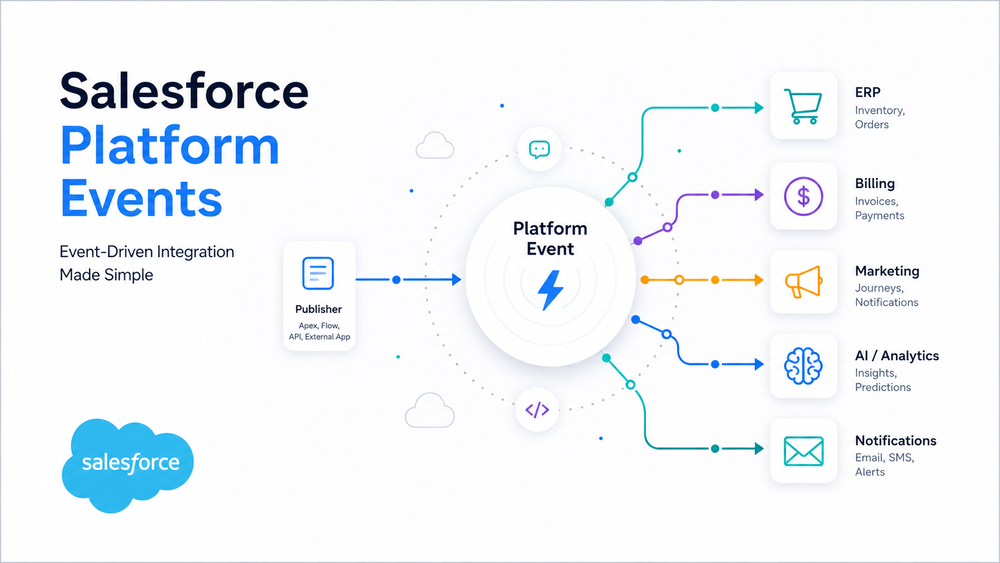
What Are Salesforce Platform Events?
Salesforce Platform Events are custom event messages that enable asynchronous communication between Salesforce and internal or external applications.
Unlike traditional request-response integrations, Platform Events follow a publish/subscribe model. A system publishes a business event without knowing which applications will consume it. Subscribers automatically receive the event and react independently.
Platform Events are built on the Salesforce Event Bus and are specifically designed for event-driven communication, making them fundamentally different from synchronous API integrations.
This architecture reduces dependencies between systems, improves scalability, and allows multiple applications to process the same business event simultaneously.
Common business events include:
- Order Created
- Payment Received
- Customer Registered
- Invoice Generated
- Shipment Delivered
Instead of calling every connected application individually, Salesforce publishes a single Platform Event. Any application subscribed to that event automatically receives and processes it.
For a complete technical overview, see the official Salesforce Platform Events documentation.
How Salesforce Platform Events Work
At the center of Salesforce Platform Events is the Salesforce Event Bus, which acts as the communication layer between publishers and subscribers.
Rather than sending information directly from one system to another, Salesforce stores published events on the Event Bus and distributes them to every interested subscriber.
The architecture looks like this:
Publisher
     │
Platform Event
     │
 Salesforce Event Bus
     │
────────────────────────────────────
│          │          │          │
Flow     Apex     External App  LWC
                      │
                  Pub/Sub API
The communication process is straightforward:
- A publisher creates a Platform Event.
- Salesforce stores the event on the Event Bus.
- Every subscribed consumer receives the event.
- Each subscriber processes the event independently.
Unlike traditional API integrations, publishers never need to know who consumes an event. Likewise, subscribers don’t depend on the publisher’s implementation.
This loose coupling is one of the biggest advantages of Salesforce Platform Events, allowing organizations to add, remove, or update subscribers without modifying existing integrations.
Why the Salesforce Event Bus Matters
The Salesforce Event Bus is what makes event-driven architecture possible.
Instead of creating direct connections between applications, it acts as an intermediary responsible for distributing events to subscribers.
This provides several advantages:
- publishers remain independent of subscribers;
- new systems can subscribe without changing existing integrations;
- multiple subscribers can process the same event simultaneously;
- integrations become easier to scale and maintain.
For enterprise organizations with dozens of connected applications, this architecture significantly reduces integration complexity.
Publishing Salesforce Platform Events
A publisher is any process capable of creating and sending a Platform Event.
Salesforce Platform Events can be published by:
- Apex;
- Flow;
- REST API;
- Pub/Sub API;
- external applications.
This flexibility allows both Salesforce and non-Salesforce systems to participate in the same event-driven architecture.
For example, after an Opportunity reaches the Closed Won stage, Apex can publish an Order Created event.
Order_Created__e eventRecord = new Order_Created__e(
    Order_Number__c = 'SO-10025',
    Status__c = 'Created'
);

EventBus.publish(eventRecord);
Notice that the publisher doesn’t send requests to ERP systems, billing platforms, or marketing tools. It simply publishes a business event, and Salesforce automatically distributes it through the Event Bus.
Subscribing to Salesforce Platform Events
Subscribers are applications or Salesforce components that listen for specific Platform Events and execute logic when an event is received.
Subscribers may include:
- Apex Triggers;
- Record-Triggered Flows;
- Lightning Web Components (empApi);
- Pub/Sub API clients;
- external systems.
Unlike traditional integrations, multiple subscribers can consume the same event simultaneously without affecting one another.
For example:
Order Created Event
        │
──────────────────────────────
│         │          │
ERP    Billing    Email Service
If another application—such as a data warehouse or AI service—needs the same information in the future, it can subscribe to the event without requiring any changes to the publisher or existing subscribers.
Salesforce provides a detailed walkthrough in the official Trailhead: Subscribe to Platform Events module.
Salesforce Platform Events vs REST API vs Change Data Capture
One of the most common architecture decisions is choosing between Salesforce Platform Events, REST APIs, and Change Data Capture (CDC).
Although all three technologies exchange information between systems, each addresses a different integration scenario.
| Feature | Platform Events | REST API | Change Data Capture |
|---|---|---|---|
| Communication Model | Publish/Subscribe | Request/Response | Event Streaming |
| Processing | Asynchronous | Synchronous | Asynchronous |
| Primary Purpose | Business events | CRUD operations | Record changes |
| Custom Event Payload | Yes | Yes | No |
| Multiple Subscribers | Yes | No | Yes |
| Coupling | Loose | Tight | Loose |
| Best For | Event-driven integrations | System-to-system requests | Data synchronization |
As a general guideline:
- choose REST APIs when an application requires an immediate response;
- choose Change Data Capture when broadcasting Salesforce record changes;
- choose Salesforce Platform Events when multiple systems need to react independently to the same business event.
If your event-driven architecture also relies on secure API communication, our Salesforce Named Credentials guide explains how to authenticate integrations using Salesforce’s modern authentication framework.
Salesforce Platform Events Enterprise Use Cases
One of the biggest advantages of Salesforce Platform Events is the ability to notify multiple systems about the same business event without creating direct point-to-point integrations.
A typical enterprise architecture might look like this:
                Salesforce
                     │
        Order Created Platform Event
                     │
          Salesforce Event Bus
                     │
 ─────────────────────────────────────────────
 │            │             │              │
 ERP       Billing     Marketing Cloud     AI
 │            │             │              │
Inventory   Invoice      Customer Journey  Analysis
Instead of writing separate integrations for every connected application, Salesforce publishes a single business event. Each subscribed system processes the event independently.
Common enterprise scenarios include:
Order Processing
When an order is created, Salesforce publishes an event that updates inventory, creates an invoice, and starts fulfillment workflows.
Customer Onboarding
A customer registration event can trigger account provisioning, marketing automation, welcome emails, and customer success workflows simultaneously.
Payment Processing
Once a payment is completed, finance systems, ERP platforms, analytics tools, and customer notification services can all react without requiring additional API calls.
This flexibility allows organizations to expand their integration ecosystem by simply adding new subscribers rather than modifying existing applications.
Salesforce Platform Events Best Practices
Building an event-driven architecture requires more than simply publishing events. Following best practices improves scalability, reliability, and long-term maintainability.
Publish Business Events
Events should represent meaningful business actions rather than individual field updates.
Examples of good events include:
- Order Created
- Payment Received
- Customer Registered
- Contract Approved
If the objective is to synchronize Salesforce record changes, Change Data Capture is generally a better fit.
Keep Event Payloads Lightweight
Avoid including unnecessary fields.
Smaller payloads:
- improve processing performance;
- reduce bandwidth;
- simplify future schema changes.
Subscribers should retrieve additional information only when necessary.
Design Loosely Coupled Integrations
Publishers should never know who consumes an event.
Similarly, subscribers should not depend on one another.
This loose coupling makes it possible to add or remove systems without modifying existing integrations.
Version Event Schemas
Business processes evolve over time.
Instead of changing existing Platform Events in ways that might break subscribers, introduce new event versions while maintaining backward compatibility whenever possible.
Use Replay IDs for Reliable Processing
Subscribers may temporarily disconnect or become unavailable.
Replay IDs allow applications to resume event consumption without missing previously published events, improving reliability in enterprise environments.
Monitor Event Consumption
Enterprise integrations should continuously monitor:
- failed event deliveries;
- subscriber processing errors;
- event throughput;
- replay status.
Monitoring helps identify issues before they impact downstream systems.
If your architecture combines APIs with event-driven communication, our Salesforce API Integration Best Practices guide provides additional recommendations for designing scalable integrations:
Common Salesforce Platform Events Mistakes
Even experienced Salesforce teams often make similar architectural mistakes.
| Common Mistake | Better Approach |
|---|---|
| Publishing every record update | Publish business events |
| Creating oversized payloads | Keep events lightweight |
| Tight coupling between systems | Design independent subscribers |
| Ignoring Replay IDs | Resume processing using replay positions |
| Using Platform Events for CRUD synchronization | Use Change Data Capture when appropriate |
| Publishing technical events instead of business events | Publish events meaningful to consumers |
Avoiding these mistakes results in more reliable integrations and lower maintenance costs.
Salesforce Platform Events Limitations
Although Salesforce Platform Events are a powerful integration mechanism, they are not suitable for every use case.
Important considerations include:
- events are processed asynchronously;
- event retention is limited;
- governor and delivery limits apply;
- duplicate event delivery should be handled gracefully;
- event ordering should not be assumed across unrelated transactions;
- published events cannot be modified after publication;
- Platform Events are not intended for high-volume CRUD synchronization.
For current platform limits and implementation details, refer to the official Salesforce Platform Events Developer Guide.
When Not to Use Salesforce Platform Events
Platform Events are not the right choice for every integration.
Consider another approach when:
- an application requires an immediate synchronous response;
- you’re exposing a traditional CRUD API;
- only Salesforce record changes need to be broadcast (Change Data Capture is usually more appropriate);
- the integration consists of a simple request-response interaction between two systems.
Choosing the appropriate integration pattern is often more important than selecting a specific technology.
How Success Craft Can Help
Designing an event-driven architecture involves much more than publishing events. Organizations need to define event schemas, choose appropriate integration patterns, secure communication, monitor event delivery, and ensure that systems remain loosely coupled as they evolve.
At Success Craft, we help organizations design and implement enterprise Salesforce integrations using Platform Events, REST APIs, Named Credentials, Flows, and other integration technologies. Our focus is on building architectures that are secure, scalable, and maintainable over the long term.
To learn more about securing Salesforce integrations, read our Salesforce OAuth Security Best Practices guide.
You can also explore our Salesforce Integration Services to see how we help organizations modernize their Salesforce integration landscape.
Conclusion
Salesforce Platform Events provide a modern foundation for building event-driven integrations between Salesforce and external systems.
By separating publishers from subscribers, organizations can reduce system dependencies, improve scalability, and simplify the evolution of enterprise integrations over time.
However, Platform Events are only one part of a broader integration strategy. REST APIs, Change Data Capture, and other Salesforce technologies each solve different problems. Selecting the right approach depends on your business requirements, performance expectations, and overall architecture.
For organizations building enterprise Salesforce solutions, understanding when—and when not—to use Platform Events is essential for creating secure, scalable, and maintainable integration ecosystems.
What are Salesforce Platform Events?
Salesforce Platform Events are custom event messages that enable asynchronous communication between Salesforce and internal or external applications using a publish/subscribe architecture.
How do Salesforce Platform Events work?
Applications publish business events to the Salesforce Event Bus. Subscribers—including Apex, Flow, Lightning Web Components, and external systems—receive and process those events independently.
When should I use Salesforce Platform Events instead of REST APIs?
Use Salesforce Platform Events when multiple applications need to react independently to the same business event. REST APIs are better suited for synchronous request-response communication.
What is the difference between Platform Events and Change Data Capture?
Platform Events publish custom business events defined by developers, while Change Data Capture automatically publishes changes made to Salesforce records.
What are Replay IDs in Salesforce Platform Events?
Replay IDs allow subscribers to resume event consumption after a disconnect, helping ensure reliable event processing in enterprise integrations.
What are the limitations of Salesforce Platform Events?
Salesforce Platform Events are asynchronous and subject to event retention, delivery, payload, and governor limits. They are intended for event-driven communication rather than traditional CRUD operations.