

Salesforce AI Implementation Guide: How Enterprises Plan, Govern, and Scale AI Automation in CRM
Artificial Intelligence is rapidly becoming a standard capability inside enterprise CRM systems. However, successful Salesforce AI implementation rarely starts with models or prompts. It starts with architecture, data readiness, and business process design.
Companies that approach AI as a feature often fail to achieve measurable impact. Organizations that treat AI as part of their system architecture succeed. This approach is typically defined during a
Salesforce consulting engagement.
This guide explains how enterprises actually implement AI in Salesforce and what steps are required to make it stable, secure, and scalable.
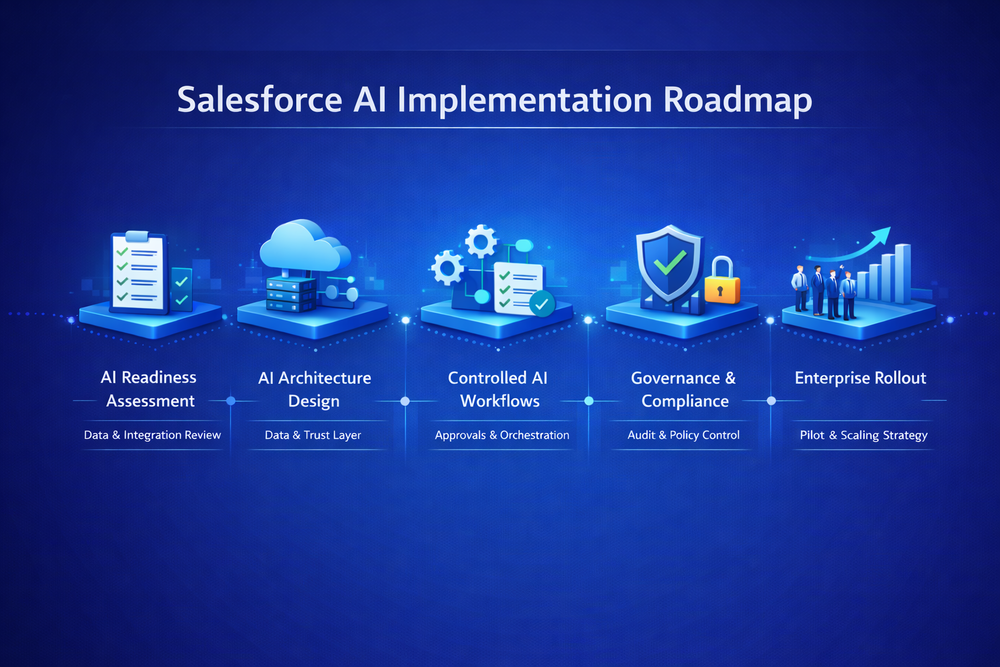
What AI in Salesforce Actually Means
AI in Salesforce is not a single feature. It is a combination of:
- predictive analytics
- generative AI assistance
- automation decision-making
- recommendations inside workflows
- data classification and enrichment
Modern implementations rely on Salesforce AI capabilities and Salesforce Data Cloud working together.
Most failures happen when companies try to add AI directly into UI processes without preparing data and integrations.
AI depends on system reliability. If your CRM processes are unstable, AI will only automate the instability — which is why organizations first stabilize Salesforce integration architecture.
Step 1 — Define the Business Outcome First
AI projects should begin with a business objective, not technology.
Good examples:
- reduce support resolution time
- improve lead qualification accuracy
- automate case categorization
- generate structured sales summaries
- predict churn risk
Bad examples:
- “we want to use AI”
- “we want Einstein”
- “competitors implemented AI”
AI must solve an operational problem, not exist as a demo capability. This phase is typically part of Salesforce consulting services.
Step 2 — Prepare Salesforce Data
AI quality equals data quality.
Before implementation you must evaluate:
- field completeness
- duplicate records
- inconsistent statuses
- missing ownership
- inconsistent lifecycle stages
AI models learn patterns. If the data is chaotic, the model learns chaos.
Typical preparation activities include:
- lifecycle normalization
- validation rules
- deduplication
- historical cleanup
- defining system of record
These activities align with Salesforce data quality guidelines and often require Salesforce implementation services.
This stage usually takes longer than AI configuration — and it is normal.
Step 3 — Design AI Architecture
AI in enterprise Salesforce rarely works as a single embedded feature.
It works as a layered architecture described in Salesforce Well-Architected Framework
Typical structure:
CRM Layer – User workflows and objects
Logic Layer – Flows, Apex orchestration
AI Layer – Predictions, generation, scoring
Integration Layer – External models via enterprise Salesforce integration
Data Layer – Warehouses and historical datasets
This separation prevents lock-in and allows scaling.
Step 4 — Implement AI Workflows (Not Just Prompts)
The most common mistake is adding AI to buttons.
Correct implementation connects AI to processes using Salesforce Flow automation and Apex orchestration patterns.
Example — Support Case:
- Case created
- Classification AI categorizes
- Priority predicted
- Routing decided automatically
- Suggested response generated
- Agent reviews and sends
AI becomes part of the workflow — not an isolated tool.
This approach is part of enterprise service automation delivered through Salesforce development services.
Step 5 — Add Governance and Control
Enterprise AI requires control mechanisms defined by Salesforce AI security and trust and internal governance processes.
Mandatory components:
- approval checkpoints
- confidence thresholds
- human review
- audit logging
- monitoring dashboards
AI without governance becomes operational risk.
This is why enterprises implement Human-in-the-Loop AI automation.
Step 6 — Rollout Strategy
Do not deploy AI globally immediately.
Correct rollout:
- Internal pilot
- Limited team rollout
- Measured KPI validation
- Gradual scaling
- Continuous training
AI systems evolve — they are not static implementations.
This approach follows standard enterprise adoption practices described in microservices adoption principles.
Common Salesforce AI Implementation Mistakes
Even mature Salesforce teams make predictable mistakes when introducing AI. The problem is rarely the model itself — it is almost always architecture, expectations, or process design.
Treating AI as a Feature Instead of a System Capability
Many organizations install AI tools and expect immediate results. They add text generation to a page or enable predictions in a field and assume value will appear automatically.
In reality, AI works only when embedded into business workflows. Without process integration, users ignore recommendations, and adoption never happens. AI must change how decisions are made — not just how screens look.
Skipping Data Preparation
This is the most common failure point.
If historical data contains:
- inconsistent statuses
- duplicate accounts
- missing ownership
- manual free-text fields
the AI model learns incorrect patterns.
The result is not neutral — it is actively misleading.
Users quickly lose trust and stop using AI outputs entirely, even after improvements.
Trying to Fully Replace Humans
Organizations sometimes aim for full automation from day one. They remove validation steps and allow AI to send emails, update deal stages, or close cases automatically.
This creates operational risk.
Enterprise AI should begin with decision assistance, not decision ownership.
Human review builds confidence, reveals model weaknesses, and creates training feedback loops. Removing this step too early causes incidents that damage trust and block further adoption.
No Monitoring or Feedback Loop
AI systems degrade over time.
Business processes change
Products change
Customer behavior changes
Without monitoring, accuracy slowly drops while automation continues to operate.
Teams often notice only after support complaints or reporting anomalies.
AI must be monitored like an integration or a production service — not like a static configuration.
Implementing UI AI Instead of Process AI
One of the most expensive mistakes is focusing on visible AI rather than operational AI.
Examples:
- email generation buttons
- summary panels
- chat assistants
These improve user experience but rarely improve business KPIs alone.
Real impact comes from workflow automation:
- routing decisions
- prioritization
- classification
- risk detection
AI should operate inside the process, not just alongside it.
Ignoring Change Management
Even correct AI implementations fail when users are not prepared.
Users need:
- explanation of how AI works
- when to trust it
- when to override it
- how feedback improves results
Without onboarding, employees treat AI as optional — and optional systems never produce measurable ROI.
When Companies Should Start AI in Salesforce
Good timing indicators:
- stable CRM processes
- consistent data structure
- clear KPIs
- defined ownership
- integration maturity confirmed by Salesforce system integration
Bad timing:
- ongoing CRM redesign
- frequent workflow changes
- unreliable reporting
AI amplifies system maturity — both good and bad.
Conclusion
Salesforce AI implementation is not a configuration task.
It is an architectural evolution of CRM operations supported by Success Craft Salesforce experts.
Successful companies:
- define measurable outcomes
- prepare data
- integrate AI into workflows
- add governance
- scale gradually
AI does not replace process design — it rewards good architecture.
What is Salesforce AI implementation?
The process of embedding predictive and generative AI into CRM workflows, architecture, and business operations.
How long does implementation take?
Usually 2–6 months depending on data readiness and integration complexity.
Do you need clean data before AI?
Yes. AI quality directly depends on structured historical data.
Can AI work without integrations?
Rarely. Most enterprise AI relies on external datasets and system communication.
What is the biggest risk?
Lack of governance and monitoring — it leads to unreliable automation.