

Salesforce Integration for Enterprises: Architecture & Best Practices
Salesforce integration is a foundational capability for modern enterprise CRM landscapes. In real-world organizations, Salesforce rarely operates as a standalone system. Instead, it acts as a central interaction layer within a broader IT ecosystem. Companies working with experienced Salesforce consulting partners like Success Craft (often discover that integration quality directly impacts data consistency, operational stability, and long-term scalability.
When Integration with Salesforce is designed correctly, it enables seamless business processes and reliable automation. When it is not, it becomes a source of hidden technical debt and operational risk.
Why Salesforce Integration Is Critical for Enterprises
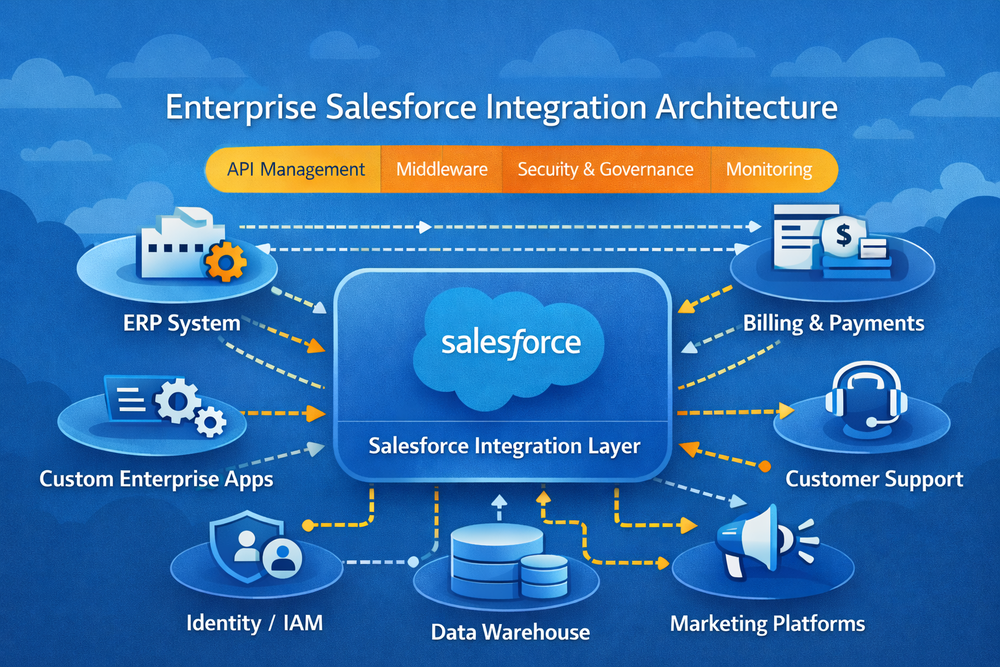
Enterprise CRM platforms must interact continuously with ERP systems, billing platforms, support tools, and data warehouses. Integration with Salesforce ensures that customer, order, and operational data flows correctly across these systems.
Without a structured integration strategy, organizations face duplicated records, broken workflows, and unreliable reporting. Over time, these issues slow down transformation initiatives, including automation and AI adoption. Many of these challenges emerge when integration decisions are made without a clear enterprise integration architecture aligned with Salesforce platform principles.
What Salesforce Integration Really Means (Beyond APIs)
Integration with Salesforce is often misunderstood as a simple API connection. In enterprise environments, it is far more complex. Integration includes data synchronization rules, business process orchestration, event handling, failure recovery, and monitoring.
Successful teams design integrations around Integration with Salesforce architecture principles rather than individual endpoints. They define data ownership, conflict resolution strategies, and operational responsibility upfront. Salesforce itself emphasizes this broader approach in its official Salesforce Integration documentation.
Common Salesforce Integration Scenarios
Across enterprise projects, several integration scenarios appear consistently.
Salesforce frequently integrates with ERP platforms for customer and order synchronization, with billing systems for subscriptions and payments, and with customer support platforms for case management. Marketing systems exchange campaign and engagement data, while analytics platforms consume CRM data for reporting.
These scenarios often rely on enterprise Integration with Salesforce patterns that balance performance, consistency, and security.
Salesforce Integration Architecture Patterns
Enterprise Integration with Salesforce relies on a small set of architectural patterns. Point-to-point integrations are easy to implement but difficult to scale. Middleware-based approaches introduce a central integration layer that handles transformation and monitoring. Event-driven architectures decouple systems and support asynchronous processing. Hub-and-spoke models centralize control while maintaining flexibility.
Architects typically evaluate these options using Salesforce integration best practices.
rather than defaulting to a single pattern. In most enterprises, hybrid approaches emerge over time.
Real-Time vs Batch Integration: Enterprise Trade-Offs
One of the most important design decisions in Integration with Salesforce is choosing between real-time and batch synchronization. Real-time integration supports immediate updates and responsive workflows but increases complexity and cost. Batch integration improves resilience and reduces load but introduces latency.
Enterprise teams usually apply both approaches selectively, based on business impact and operational constraints. This balance is a core part of effective Salesforce system integration at scale.
Security and Governance in Salesforce Integration
Security is a defining concern in enterprise Integration with Salesforce. Each integration expands the system boundary and increases potential exposure. Secure designs rely on strong authentication, granular authorization, encrypted communication, and controlled access to sensitive data.
Governance complements security by defining ownership, change management processes, and monitoring standards. Many organizations align integration governance with recommendations from Salesforce Security and Compliance documentation.
Common Salesforce Integration Mistakes
Despite mature platforms, integration projects often fail due to recurring mistakes. Teams hard-code logic into Salesforce or external systems, creating tight coupling. Error handling and monitoring are neglected, leading to delayed incident detection.
Another common issue is unclear ownership. Without accountability, integrations degrade over time. These problems frequently surface during audits or major system changes, reinforcing the need for structured Integration with Salesforce reviews.
Best Practices for Enterprise Salesforce Integration
Effective enterprise Integration with Salesforce follows several consistent principles. Architecture decisions precede implementation. Integration ownership is clearly defined. Systems are loosely coupled and resilient to failure.
Monitoring, alerting, and documentation are treated as core components. Integration designs evolve alongside business and technology changes. These principles align with widely adopted enterprise integration patterns used across large organizations.
How Success Craft Designs Salesforce Integration Architecture
Success Craft approaches Integration with Salesforce as an architectural and operational discipline. Projects typically begin with an assessment of existing data flows, dependencies, and risks through enterprise Salesforce consulting services.
Based on this assessment, teams design scalable integration architectures, implement secure solutions, and support rollout and stabilization. Many engagements include secure Salesforce integrations.
with ERP, billing, and support systems, as well as complex workflows built through enterprise Salesforce architecture and hybrid applications.
This approach helps organizations avoid recurring failures and build a reliable foundation for automation and AI initiatives.
When Enterprises Need Integration Review or Redesign
Organizations often reach a point where existing Integration with Salesforce no longer scale. Warning signs include frequent synchronization issues, growing operational effort, inconsistent data, or the addition of new systems.
Integration review becomes essential before large transformations, mergers, or advanced automation initiatives. Addressing integration challenges early significantly reduces long-term cost and risk.
Conclusion
Integration with Salesforce is not a feature or a one-time task. It is a core architectural capability that determines how effectively CRM supports enterprise operations. Well-designed Salesforce integration enables scalability, reliability, and innovation. Poor integration introduces technical debt and operational risk.
By applying architectural discipline, governance, and best practices, enterprises can turn Salesforce into a stable foundation for digital transformation.
What is Integration with Salesforce?
Integration with Salesforce connects Salesforce with other enterprise systems to exchange data and coordinate processes.
How does Salesforce integrate with ERP systems?
ERP integration typically uses APIs, middleware, or event-driven architectures depending on scale and requirements.
What is the best Integration with Salesforce architecture?
There is no universal best architecture. Enterprises usually combine multiple patterns based on context.
Is middleware required for Integration with Salesforce?
Middleware is not always required, but it becomes important as complexity and governance needs increase.
How secure are Integration with Salesforce?
Security depends on architecture, authentication, authorization, and monitoring practices.
How can Success Craft help with Integration with Salesforce?
Success Craft designs, implements, and supports enterprise-grade Salesforce integration architectures.