

Salesforce Pub/Sub API: Complete Guide for Enterprise Integrations
Modern enterprise applications exchange millions of events every day. Customer orders, payment confirmations, inventory updates, support requests, and CRM changes often need to be shared across multiple systems almost instantly.
Salesforce is frequently at the center of this ecosystem, integrating with ERP platforms, customer portals, analytics solutions, AI services, and cloud applications. As organizations grow, continuously polling APIs for updates becomes increasingly inefficient, generating unnecessary requests, increasing infrastructure costs, and introducing synchronization delays.
The Salesforce Pub/Sub API addresses these challenges by providing a modern event streaming interface built on gRPC. Instead of repeatedly asking Salesforce whether data has changed, applications maintain a persistent connection and receive events as they happen through the Salesforce Event Bus.
If you’re building modern Salesforce integrations, we also recommend reading our previous guides:
- Salesforce Platform Events: Complete Guide to Event-Driven Integration
- Salesforce Change Data Capture: Complete Guide to Real-Time Data Synchronization
These articles explain the event types that are delivered through the Salesforce Pub/Sub API.
In this guide, you’ll learn what Salesforce Pub/Sub API is, why Salesforce introduced it, how it works, how it compares with Streaming API and REST API, and the best practices for designing scalable enterprise integrations.
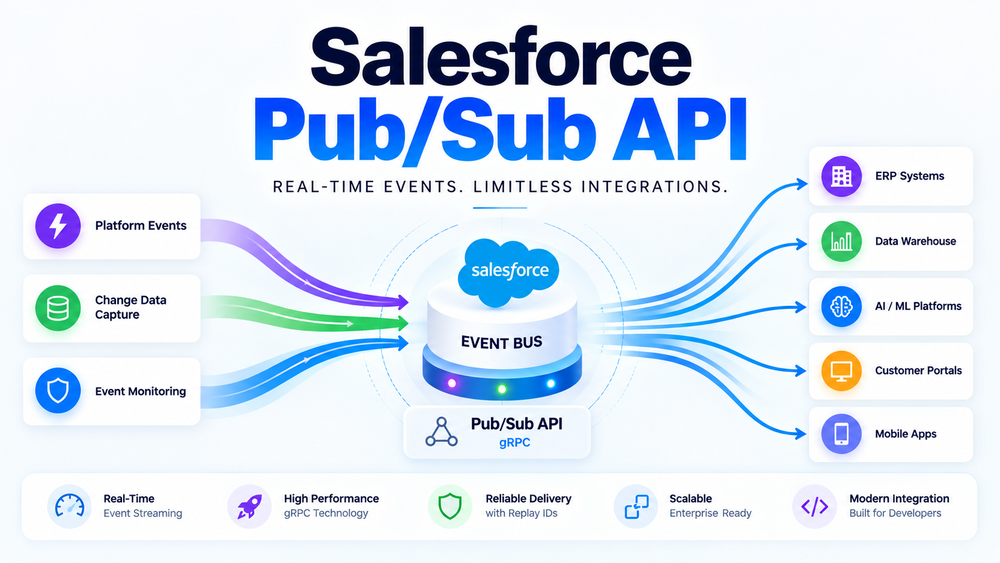
What Is Salesforce Pub/Sub API?
Salesforce Pub/Sub API is Salesforce’s modern event streaming API that enables external applications to publish and subscribe to events through a single, high-performance interface.
Unlike REST APIs, which follow a request-response model, Pub/Sub API maintains a persistent connection between Salesforce and subscriber applications. Events are delivered continuously as they occur instead of requiring repeated API requests.
The API is built on gRPC (Google Remote Procedure Call), an open-source communication framework optimized for low latency, bidirectional streaming, and high-performance distributed systems.
Salesforce Pub/Sub API currently supports three primary event types:
- Platform Events
- Change Data Capture (CDC)
- Real-Time Event Monitoring Events (where licensed)
Rather than interacting with each technology separately, Pub/Sub API provides one consistent interface for consuming and publishing supported Salesforce events.
In simple terms:
Applications subscribe to Salesforce events instead of continuously polling Salesforce for updates.
For a technical overview, see the official Salesforce documentation.
Why Salesforce Introduced Pub/Sub API
Before Pub/Sub API was introduced, Salesforce developers primarily relied on the Streaming API, which uses the CometD/Bayeux protocol for event delivery.
Although Streaming API remains fully supported, it was designed before modern cloud-native and microservices architectures became widespread.
As enterprise integrations evolved, Salesforce needed an API capable of handling higher event volumes while providing lower latency and a simpler programming model.
Salesforce introduced Pub/Sub API to provide:
- higher throughput;
- lower latency;
- bidirectional streaming;
- native gRPC support;
- simplified client architecture;
- better enterprise scalability.
The differences are summarized below.
| Legacy Streaming API | Salesforce Pub/Sub API |
|---|---|
| CometD / Bayeux | gRPC |
| HTTP-based communication | Persistent streaming |
| Higher protocol overhead | Lower latency |
| Older architecture | Modern cloud-native design |
| Separate publishing models | Unified publish/subscribe interface |
For organizations processing thousands—or even millions—of business events every day, these improvements significantly simplify enterprise integration architecture.
Why Choose Pub/Sub API Over Traditional API Polling?
Many legacy integrations rely on scheduled API polling.
In this model, external systems continuously send requests asking Salesforce whether records or business events have changed. Even when nothing has changed, these requests still consume API resources and increase infrastructure overhead.
Salesforce Pub/Sub API replaces this inefficient approach with continuous event streaming.
Instead of asking for updates, applications receive them automatically whenever an event is published.
| Traditional API Polling | Salesforce Pub/Sub API |
|---|---|
| Scheduled API requests | Continuous event streaming |
| Higher API usage | Lower API consumption |
| Delayed synchronization | Near real-time updates |
| Additional scheduling logic | Native Salesforce event delivery |
| Periodic synchronization | Continuous synchronization |
For organizations integrating Salesforce with ERP systems, analytics platforms, customer portals, and AI services, this event-driven approach provides better scalability while reducing unnecessary API traffic.
Salesforce Event Bus Architecture
One of the most common misconceptions is that Pub/Sub API replaces Platform Events or Change Data Capture.
It does not.
Instead, Salesforce Pub/Sub API is the communication layer that allows applications to interact with the Salesforce Event Bus.
The overall architecture looks like this:
Business Applications
        │
────────┼────────
│               │
Platform Events  Change Data Capture
        │
────────┴────────
      Salesforce
      Event Bus
           │
     Salesforce
      Pub/Sub API
           │
──────────────────────────────────────────────
│          │            │             │
ERP     Analytics   Data Lake     AI Services
The Salesforce Event Bus acts as the central messaging layer inside Salesforce.
Whenever an event is published—either manually through Platform Events or automatically through Change Data Capture—it becomes available to subscribers connected through the Pub/Sub API.
This architecture provides several advantages:
- loose coupling between publishers and subscribers;
- multiple applications can consume the same event simultaneously;
- subscribers can be added without modifying Salesforce business logic;
- enterprise integrations remain easier to scale and maintain.
Understanding this separation between event generation and event delivery is essential when designing event-driven Salesforce architectures.
How Salesforce Pub/Sub API Works
Salesforce Pub/Sub API follows the classic publish-subscribe communication model.
Events flow continuously from publishers to subscribers through the Salesforce Event Bus.
The architecture can be represented as follows:
Publisher
      │
Platform Event
      │
Salesforce Event Bus
      │
Salesforce Pub/Sub API
      │
────────────────────────────
│          │            │
Subscriber 1  Subscriber 2  Subscriber 3
The workflow consists of five simple steps:
- A business process publishes an event or Salesforce automatically generates a Change Event.
- The event is stored in the Salesforce Event Bus.
- Subscriber applications maintain a persistent connection through the Pub/Sub API.
- Salesforce streams events to connected subscribers.
- Each subscriber independently processes the event.
Unlike traditional REST APIs, subscribers do not repeatedly request updates.
Instead, Salesforce continuously streams events as they become available.
Why gRPC Makes a Difference
One of the biggest architectural improvements introduced by Pub/Sub API is its use of gRPC.
Unlike REST APIs, which create a new HTTP request for every operation, gRPC maintains a persistent bidirectional connection between Salesforce and subscriber applications.
A simplified architecture looks like this:
Application
      │
gRPC Connection
      │
Salesforce Pub/Sub API
      │
Salesforce Event Bus
This persistent communication model offers several advantages:
- lower network overhead;
- reduced latency;
- higher throughput;
- efficient binary serialization;
- better scalability for enterprise workloads.
These characteristics make Pub/Sub API particularly well suited for organizations processing large volumes of real-time events.
Publish vs Subscribe Operations
The name Pub/Sub stands for Publish and Subscribe—the two fundamental operations supported by the API.
Although closely related, they perform different roles.
Publishing Events
Publishing means sending an event into the Salesforce Event Bus.
Typical Platform Events include:
- Order Approved
- Invoice Generated
- Payment Completed
- Customer Onboarded
The publisher simply creates the event.
It does not need to know which applications will eventually consume it.
Subscribing to Events
Subscribing means listening for published events.
For example, an ERP application may subscribe to:
- Account Change Events;
- Opportunity Change Events;
- Platform Events;
- Event Monitoring Events.
Whenever Salesforce publishes one of these events, the subscriber immediately receives it and executes the required business logic.
| Publish | Subscribe |
|---|---|
| Sends events | Receives events |
| Producer | Consumer |
| Creates event stream | Processes event stream |
| Starts communication | Reacts to communication |
This loose coupling allows multiple independent systems to process the same event simultaneously without affecting one another.
Supported Event Types
Salesforce Pub/Sub API supports several categories of enterprise events.
| Event Type | Supported |
|---|---|
| Platform Events | ✅ |
| Change Data Capture | ✅ |
| Real-Time Event Monitoring | ✅ (where licensed) |
Each event type serves a different purpose.
| Event Type | Generated By |
|---|---|
| Platform Events | Developer or Application |
| Change Data Capture | Salesforce Platform |
| Event Monitoring Events | Salesforce Platform |
Platform Events represent custom business processes.
Change Data Capture automatically publishes record changes.
Real-Time Event Monitoring provides operational and security events generated by Salesforce itself.
Because all of these events are delivered through the same API, organizations can standardize on a single integration model regardless of the underlying event type.
Replay IDs and Reliable Event Delivery
Enterprise integrations must remain reliable even when temporary network interruptions occur.
To support this, Salesforce assigns every published event a unique Replay ID.
Replay IDs allow subscriber applications to reconnect and continue consuming events from the last successfully processed position instead of starting over.
A simplified workflow looks like this:
Subscriber Connected
        │
Receive Events
        │
Connection Lost
        │
Reconnect
        │
Replay ID
        │
Continue Processing
Imagine an ERP application temporarily loses its connection to Salesforce.
Without Replay IDs, events published during that outage could be missed.
By reconnecting with the last successfully processed Replay ID, the subscriber resumes processing without losing important business events.
Replay IDs do not permanently store events. Instead, they provide a mechanism for subscribers to continue processing events within Salesforce’s event retention window after temporary interruptions.
Salesforce Pub/Sub API vs Streaming API vs REST API
Selecting the right integration technology depends on your business requirements.
Although all three APIs exchange information with Salesforce, they are designed for different purposes.
| Feature | Pub/Sub API | Streaming API | REST API |
|---|---|---|---|
| Protocol | gRPC | CometD | HTTP |
| Real-Time Communication | Yes | Yes | No |
| Publish Events | Yes | Limited | No |
| Subscribe to Events | Yes | Yes | No |
| Bidirectional Streaming | Yes | No | No |
| Enterprise Scalability | Excellent | Good | Moderate |
| Best Use Case | Event-driven integrations | Legacy streaming | CRUD operations |
As a general recommendation:
- choose Salesforce Pub/Sub API for modern event-driven architectures;
- use Streaming API when maintaining existing legacy implementations;
- use REST API for synchronous CRUD operations and request-response integrations.
For additional guidance on designing secure Salesforce integrations, see our Salesforce API Best Practices guide.
Salesforce Pub/Sub API Enterprise Use Cases
The Salesforce Pub/Sub API is designed for organizations that need secure, scalable, and reliable event streaming between Salesforce and external systems.
Rather than continuously polling Salesforce for updates, applications subscribe to events as they occur, allowing data to flow across enterprise systems in near real time.
A typical architecture looks like this:
                 Salesforce
                      │
      Platform Events / CDC Events
                      │
             Salesforce Event Bus
                      │
             Salesforce Pub/Sub API
                      │
────────────────────────────────────────────────────
│              │               │                │
 ERP      Data Warehouse    AI Platform    Customer Portal
Because every subscriber receives only the events it needs, organizations can continue expanding their integration landscape without significantly increasing architectural complexity.
Below are several common enterprise use cases.
ERP Synchronization
Many organizations synchronize Salesforce with ERP systems such as SAP, Oracle, or Microsoft Dynamics.
Whenever customer information, opportunities, products, pricing, or inventory changes inside Salesforce, corresponding events are streamed through the Pub/Sub API.
This enables ERP systems to update their own records immediately without relying on scheduled synchronization jobs.
The result is:
- lower synchronization latency;
- fewer API requests;
- improved consistency across business systems.
Change Data Capture Consumers
One of the most common use cases for Salesforce Pub/Sub API is consuming Change Data Capture (CDC) events.
Whenever Salesforce records are created, updated, deleted, or restored, Salesforce automatically generates Change Events that become available through the Event Bus.
Subscriber applications receive these events almost immediately, allowing external systems to remain synchronized without polling Salesforce.
For a detailed explanation of Change Data Capture, read our guide:
Salesforce Change Data Capture: Complete Guide to Real-Time Data Synchronization
Platform Event Processing
Organizations often publish custom business events such as:
- Order Approved
- Invoice Generated
- Contract Signed
- Customer Registered
- Payment Received
Subscriber applications consume these Platform Events independently.
Because publishers never communicate directly with subscribers, new systems can be added without modifying existing integrations.
Data Warehouses and Analytics
Business intelligence platforms require continuously updated Salesforce information.
Instead of importing complete datasets every hour, analytics platforms subscribe to incremental business events.
This enables:
- near real-time dashboards;
- faster reporting;
- reduced ETL workloads;
- more efficient data processing.
AI and Machine Learning
Modern AI applications depend on current CRM information.
By subscribing to Salesforce events through the Pub/Sub API, AI platforms immediately receive customer interactions, sales updates, and service activities.
This allows predictive models to work with current business data instead of outdated snapshots.
Multi-Org Salesforce Architectures
Large enterprises frequently operate multiple Salesforce organizations.
Rather than building complex point-to-point integrations, organizations can stream events between environments using the Pub/Sub API, simplifying synchronization across distributed Salesforce implementations.
Microservices Architecture
Many organizations have adopted microservices instead of monolithic applications.
In these environments, each service subscribes only to the events relevant to its responsibilities.
This architecture improves scalability while reducing dependencies between applications.
IoT and Connected Devices
Manufacturing, logistics, and healthcare organizations increasingly integrate Salesforce with connected devices.
Sensors and IoT platforms can publish operational events that trigger Salesforce business processes, while Salesforce-generated events can be streamed back to operational systems for automated responses.
This event-driven communication reduces latency and enables near real-time operational visibility.
Salesforce Pub/Sub API Best Practices
Successfully implementing Salesforce Pub/Sub API requires more than simply connecting a client.
The following recommendations help organizations build reliable and scalable event-driven integrations.
Design Idempotent Subscribers
Distributed systems occasionally receive duplicate events.
Subscriber applications should therefore be idempotent, meaning that processing the same event multiple times always produces the same business outcome.
Always Store Replay IDs
Replay IDs are essential for reliable event processing.
Persist the most recently processed Replay ID so subscribers can recover gracefully after temporary outages or network interruptions.
Authenticate Securely
Use secure OAuth authentication and follow Salesforce security recommendations.
If your Salesforce integrations call external services, our Salesforce Named Credentials guide explains how to simplify authentication management while improving security.
Keep Subscriber Processing Lightweight
Subscribers should validate and route events quickly.
Resource-intensive operations should be delegated to asynchronous workers, queues, or downstream processing services.
This prevents subscriber bottlenecks while improving overall throughput.
Design for Horizontal Scaling
Enterprise integrations often process thousands of events every minute.
Subscriber applications should support horizontal scaling so multiple instances can process event streams simultaneously without becoming a performance bottleneck.
Monitor Event Throughput
Production integrations should continuously monitor:
- subscriber availability;
- processing latency;
- reconnect attempts;
- failed deliveries;
- Replay ID progress;
- overall integration health.
Monitoring allows teams to detect synchronization problems before they affect business operations.
Handle Reconnects Automatically
Temporary network interruptions are inevitable.
Subscriber applications should automatically reconnect and resume processing from the latest Replay ID without manual intervention.
Subscribe Only to Required Events
Avoid subscribing to every available event.
Each application should consume only the event types required for its business responsibilities.
This reduces processing overhead while simplifying application logic.
Document Event Schemas
As the number of publishers and subscribers grows, maintaining clear documentation becomes increasingly important.
Document:
- event names;
- payload structures;
- publishers;
- subscribers;
- business ownership.
Good documentation makes future maintenance significantly easier.
Common Salesforce Pub/Sub API Mistakes
Even experienced Salesforce teams make similar implementation mistakes.
| Common Mistake | Better Approach |
|---|---|
| Using REST API for continuous streaming | Use Pub/Sub API |
| Ignoring Replay IDs | Resume processing after reconnect |
| Heavy subscriber processing | Process asynchronously |
| No monitoring | Continuously monitor subscribers |
| Subscribing to unnecessary events | Subscribe selectively |
| Treating Pub/Sub API as a CRUD API | Use REST API for CRUD operations |
| Assuming Pub/Sub API replaces Platform Events | Pub/Sub API delivers Platform Events and CDC events |
Avoiding these mistakes leads to more reliable, scalable, and maintainable integrations.
Salesforce Pub/Sub API Limitations
Although Salesforce Pub/Sub API is a powerful technology, architects should understand its limitations before implementation.
Key considerations include:
- a gRPC client is required;
- communication is asynchronous rather than synchronous;
- only supported Salesforce event types can be published or consumed;
- Replay IDs operate within Salesforce’s event retention window;
- governor and event delivery limits still apply;
- proper authentication and authorization are required;
- Pub/Sub API is optimized for streaming events rather than querying Salesforce records or performing CRUD operations.
Understanding these limitations helps organizations choose the appropriate integration technology for each business scenario.
For complete implementation details, refer to the official Salesforce documentation.
When Should You Use Salesforce Pub/Sub API?
The following table summarizes when Pub/Sub API is the appropriate choice.
| Scenario | Recommended |
|---|---|
| Platform Events | ✅ |
| Change Data Capture | ✅ |
| Event-driven enterprise integrations | ✅ |
| Real-time streaming | ✅ |
| CRUD operations | ❌ |
| One-time API requests | ❌ |
As a general guideline:
- use Salesforce Pub/Sub API for modern event-driven architectures;
- use Platform Events when publishing custom business events;
- use Change Data Capture for automatic record synchronization;
- use REST API for synchronous request-response communication.
How Success Craft Can Help
Designing a successful event-driven architecture requires selecting the right technologies, defining clear event contracts, and ensuring reliable communication between distributed systems.
At Success Craft, we help organizations build secure and scalable Salesforce integration solutions using Salesforce Pub/Sub API, Platform Events, Change Data Capture, Named Credentials, and other enterprise integration technologies.
Whether you’re modernizing legacy integrations or designing a cloud-native architecture, our team can help build solutions that remain reliable, maintainable, and ready to scale as your business grows.
Learn more about our Salesforce services.
Conclusion
Salesforce Pub/Sub API represents Salesforce’s modern approach to event-driven integration.
Built on gRPC and tightly integrated with the Salesforce Event Bus, it provides a unified interface for publishing and consuming Platform Events, Change Data Capture, and other supported event types.
Compared with legacy Streaming API implementations, Pub/Sub API delivers lower latency, improved scalability, and a simpler programming model for enterprise applications.
As Salesforce continues investing in event-driven architecture, Salesforce Pub/Sub API is becoming the recommended foundation for organizations building secure, scalable, and reliable real-time integrations. When combined with technologies such as Platform Events, Change Data Capture, and Named Credentials, it enables enterprise systems to exchange business events efficiently while reducing infrastructure complexity and long-term maintenance costs.
What is Salesforce Pub/Sub API?
Salesforce Pub/Sub API is a modern event streaming API built on gRPC that allows external applications to publish and subscribe to Salesforce events through the Salesforce Event Bus. It supports Platform Events, Change Data Capture, and Real-Time Event Monitoring events.
How does Salesforce Pub/Sub API work?
Applications connect to the Salesforce Event Bus using a persistent gRPC connection. Publishers send events to the Event Bus, while subscribers receive events in near real time without repeatedly polling Salesforce APIs.
What is the difference between Pub/Sub API and Streaming API?
Pub/Sub API uses gRPC for bidirectional streaming and improved performance, while Streaming API is based on the older CometD/Bayeux protocol. Pub/Sub API provides better scalability, lower latency, and a unified interface for modern event-driven integrations.
Does Salesforce Pub/Sub API support Change Data Capture?
Yes. Salesforce Pub/Sub API supports Change Data Capture (CDC) events, allowing external systems to receive automatic notifications whenever supported Salesforce records are created, updated, deleted, or restored.
Can Salesforce Pub/Sub API publish Platform Events?
Yes. In addition to subscribing to events, Pub/Sub API can publish Platform Events, enabling external applications to trigger business processes inside Salesforce.
What are Replay IDs in Salesforce Pub/Sub API?
Replay IDs are unique identifiers assigned to published events. They allow subscriber applications to reconnect after temporary interruptions and continue processing events from the last successfully received position.
When should I use Salesforce Pub/Sub API instead of REST API?
Use Salesforce Pub/Sub API for real-time, event-driven communication and continuous event streaming. REST API is better suited for synchronous CRUD operations, record queries, and request-response integrations.