

Customer Portal vs Partner Portal: Which Experience Cloud Solution Is Right for Your Business?
Many organizations evaluating Salesforce Experience Cloud eventually face the same question:
Customer Portal vs Partner Portal — which solution is the right choice for their business?
Customers expect instant access to support resources, account information, and service requests. Meanwhile, partners need efficient ways to collaborate, register deals, manage opportunities, and access sales resources.
This is where Salesforce Experience Cloud becomes a powerful solution.
Although the terms Customer Portal and Partner Portal are still widely used, modern Salesforce implementations are typically built using Experience Cloud.
Experience Cloud provides the foundation for creating secure digital experiences for customers, partners, employees, and other external audiences from a single Salesforce platform.
Learn more about Salesforce Experience Cloud
Choosing the wrong portal strategy can create unnecessary complexity, increase licensing costs, and limit future scalability.
In this guide, we’ll compare Customer Portal vs Partner Portal, explore common use cases, and help you determine which Experience Cloud solution best fits your business needs.
Suggested Hero Image Alt Text:
Customer Portal vs Partner Portal in Salesforce Experience Cloud
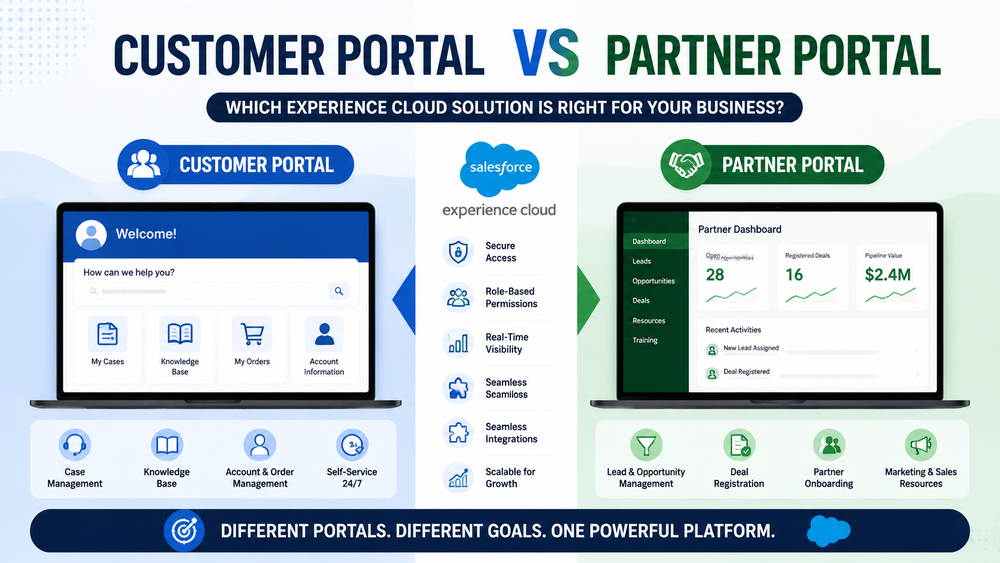
Experience Cloud: The Foundation Behind Both Portals
Before comparing Customer Portal vs Partner Portal, it’s important to understand that both solutions are powered by Salesforce Experience Cloud.
Experience Cloud enables organizations to create portals, help centers, partner sites, self-service communities, and other digital experiences connected directly to Salesforce CRM data.
Organizations use Experience Cloud to:
- provide self-service support;
- collaborate with external users;
- securely share business data;
- automate business processes;
- extend Salesforce beyond internal teams.
One of the biggest advantages of Experience Cloud is flexibility.
A single Salesforce organization can support multiple audiences with different access levels, user experiences, and business objectives.
While Customer Portals and Partner Portals serve different users, they share the same platform foundation.
The difference lies in how users interact with the system and what business goals the portal is designed to support.
Additional Salesforce documentation
Start With Your Users
Before evaluating features, start by identifying who will use the portal.
When evaluating Customer Portal vs Partner Portal, understanding the target audience is often the most important factor.
Customer Portals and Partner Portals are designed for fundamentally different groups of users.
Customer Portal Users
Typically include:
- customers;
- clients;
- subscribers;
- account holders;
- service users.
Their primary objective is self-service.
They want quick answers, support access, and visibility into their interactions with your organization.
Partner Portal Users
Typically include:
- resellers;
- distributors;
- franchisees;
- implementation partners;
- channel partners.
Their primary objective is collaboration and revenue generation.
Rather than consuming services, these users actively participate in sales and business development activities.
Choosing the wrong audience model often results in poor adoption, unnecessary complexity, and lower return on investment.
That’s why understanding your users should always be the first step in portal planning.
What Is a Customer Portal?
A Customer Portal is designed to provide customers with secure self-service access to information, support resources, and business processes.
Instead of contacting support for every request, customers can access information independently and resolve many issues on their own.
Primary Goal
Customer self-service.
Typical Features
A Salesforce Customer Portal often includes:
- Case creation and tracking;
- Knowledge Base access;
- Account management;
- Product documentation;
- Service history;
- Order visibility;
- Support request submission.
Business Benefits
Organizations commonly implement Customer Portals to:
- reduce support workload;
- lower operational costs;
- improve customer satisfaction;
- provide 24/7 service access;
- accelerate issue resolution.
As a result, support teams can focus on more complex issues while customers gain faster access to information.
For many organizations, a well-designed Customer Portal becomes a critical part of the overall customer experience strategy.
Related Reading
Salesforce Customer Portal Adoption: 5 Mistakes to Avoid
What Is a Partner Portal?
A Partner Portal is designed for external organizations that actively contribute to revenue generation and business growth.
Unlike customers, partners typically require broader access to Salesforce data and deeper collaboration capabilities.
Primary Goal
Partner relationship management and channel collaboration.
Typical Features
A Salesforce Partner Portal often includes:
- Lead sharing;
- Opportunity management;
- Deal registration;
- Partner onboarding;
- Marketing resources;
- Training materials;
- Sales collaboration tools;
- Channel performance visibility.
Common Partner Portal Capabilities
Many organizations use Partner Portals to support:
- lead distribution;
- opportunity collaboration;
- deal registration programs;
- partner enablement;
- partner scorecards;
- channel marketing initiatives.
Learn more about Salesforce Partner Relationship Management
Business Benefits
Organizations implement Partner Portals to:
- strengthen partner relationships;
- increase channel productivity;
- improve sales visibility;
- accelerate deal cycles;
- support indirect sales models.
Consequently, partners can work more effectively while businesses gain greater visibility into channel performance and pipeline activity.
Partner Portals are especially valuable for companies that rely on distributors, resellers, affiliates, or implementation partners.
Customer Portal vs Partner Portal: Key Differences
Although both solutions are built on Experience Cloud, they solve different business challenges.
| Area | Customer Portal | Partner Portal |
|---|---|---|
| Primary Audience | Customers | Partners |
| Main Goal | Self-Service | Sales Collaboration |
| Cases | ✓ | ✓ |
| Knowledge Base | ✓ | ✓ |
| Leads | ✗ | ✓ |
| Opportunities | Limited | ✓ |
| Deal Registration | ✗ | ✓ |
| Marketing Resources | Limited | ✓ |
| Channel Sales | ✗ | ✓ |
| CRM Access | Limited | Extended |
The biggest difference is simple:
Customer Portals focus on support and self-service, while Partner Portals focus on collaboration, channel management, and revenue generation.
Can You Use Both?
Absolutely.
Many organizations assume they must choose between a Customer Portal and a Partner Portal.
However, the answer to the Customer Portal vs Partner Portal question is not always one or the other.
Many successful Experience Cloud implementations use both.
For example:
- customers access support resources through a Customer Portal;
- partners collaborate on opportunities through a Partner Portal;
- both experiences operate within the same Salesforce environment.
Experience Cloud supports multiple audiences, access models, and business processes from a single platform.
This approach is particularly common among:
- software companies;
- manufacturers;
- technology vendors;
- global service providers.
By serving different audiences through separate experiences, organizations can provide each group with the tools they need while maintaining centralized Salesforce management.
The question isn’t always “Customer Portal or Partner Portal?”
In many cases, the right answer is “Both.”
Licensing and Scalability Considerations
Functionality is important when choosing a portal.
However, licensing, security, and long-term scalability should also influence the decision.
Many organizations focus exclusively on immediate requirements. As a result, they often find themselves redesigning portal architecture as the business grows.
When evaluating Customer Portal vs Partner Portal, think beyond today’s use cases.
Consider:
- expected user growth;
- future partner programs;
- expansion into new markets;
- additional external audiences;
- integration requirements;
- long-term maintenance costs.
A portal should support where your business is going—not just where it is today.
Security and Data Access Considerations
Security is one of the most important aspects of any Experience Cloud implementation.
Customers and partners should only see information relevant to their role.
Fortunately, Salesforce provides extensive controls for managing external user access.
Organizations can configure:
- role-based access;
- sharing rules;
- permission sets;
- account-based visibility;
- object-level security;
- field-level security.
For example, customers may only access their own support cases, while partners may gain access to shared opportunities and channel-related information.
A well-designed security model protects sensitive data while ensuring users can access the resources they need.
This is one of the most important architectural decisions in any Experience Cloud project.
Common Business Scenarios
The right portal often becomes obvious when viewed through real-world business scenarios.
Scenario 1: SaaS Company
A software company wants customers to:
- create support cases;
- access knowledge articles;
- view subscriptions;
- download documentation.
Recommended Solution
Customer Portal
The primary objective is customer self-service and support efficiency.
Scenario 2: Manufacturing Company With Distributors
A manufacturer works through distributors and resellers.
Partners need to:
- register deals;
- collaborate on opportunities;
- access marketing resources;
- participate in training programs.
Recommended Solution
Partner Portal
The primary objective is channel collaboration and revenue growth.
Scenario 3: Global Technology Vendor
A technology company serves both customers and channel partners.
Customers require support resources.
Partners require sales enablement tools.
Recommended Solution
Both
Customers use a Customer Portal.
Partners use a Partner Portal.
Both experiences operate within the same Salesforce ecosystem.
This is often the most scalable long-term approach.
Common Mistakes When Selecting a Portal
Choosing the right portal isn’t only about features.
Many organizations encounter challenges because they overlook business requirements, user experience, or future growth.
Choosing Based Only on Current Requirements
Today’s needs may not reflect tomorrow’s reality.
A portal designed solely around current requirements may become restrictive as the business expands.
Always evaluate future growth scenarios.
Ignoring User Experience
Even the most powerful portal will fail if users struggle to navigate it.
Successful portals prioritize:
- simplicity;
- usability;
- accessibility;
- mobile responsiveness.
Portal adoption often depends more on user experience than on technical capabilities.
Overcomplicating Access Models
Complex permission structures frequently create:
- administrative overhead;
- support requests;
- security concerns;
- maintenance challenges.
Whenever possible, keep access models simple and scalable.
Underestimating Integration Requirements
External users often need information from multiple systems.
For example:
- ERP platforms;
- billing systems;
- support applications;
- document management solutions.
Ignoring integrations early can significantly increase implementation complexity later.
Learn more about Salesforce integrations
Partner Central: A Powerful Option for Channel Businesses
Organizations building Partner Portals should also evaluate Salesforce Partner Central.
Partner Central provides a framework specifically designed for partner relationship management.
Common capabilities include:
- lead distribution;
- deal registration;
- partner onboarding;
- channel marketing;
- pipeline visibility;
- sales performance tracking;
- partner enablement.
For businesses with large partner ecosystems, Partner Central can accelerate implementation while reducing development effort.
Learn more about Salesforce Partner Relationship Management
Suggested Mid-Article Image Alt Text:
Customer Portal vs Partner Portal comparison in Salesforce Experience Cloud
Customer Portal vs Partner Portal: Which One Should You Choose?
If you’re still deciding, focus on the primary business objective.
Choose a Customer Portal if:
✓ your priority is customer self-service
✓ customers submit support requests
✓ knowledge articles are important
✓ reducing support workload is a business goal
✓ customer experience is a strategic priority
Choose a Partner Portal if:
✓ partners generate revenue
✓ opportunities are shared
✓ deal registration is required
✓ channel sales are important
✓ partner collaboration drives growth
Consider Both if:
✓ you serve customers and partners
✓ multiple external audiences need Salesforce access
✓ your business relies on channel sales
✓ long-term scalability is important
Many organizations successfully implement both experiences within Salesforce Experience Cloud.
How Success Craft Can Help
Choosing the right portal strategy is only the first step.
A successful Experience Cloud implementation also requires thoughtful architecture, security design, integrations, and ongoing optimization.
At Success Craft, we help organizations build scalable Experience Cloud solutions that support business growth and improve user engagement.
Our team can assist with:
- Experience Cloud strategy;
- Customer Portal implementation;
- Partner Portal implementation;
- portal architecture;
- security and sharing models;
- Salesforce integrations;
- custom Experience Cloud development.
Learn more:
Salesforce Portals Development
Salesforce Consulting Services
Conclusion
When evaluating Customer Portal vs Partner Portal, the right choice depends on your users, business processes, and long-term objectives.
Customer Portals focus on self-service, support efficiency, and customer experience.
Partner Portals focus on collaboration, channel management, and revenue generation.
Organizations that support both audiences often achieve the best results by implementing both experiences within Salesforce Experience Cloud.
The best portal isn’t the one with the most features.
It’s the one that helps your users achieve their goals efficiently while supporting the future growth of your business.
What is the difference between a Customer Portal and a Partner Portal in Salesforce?
A Customer Portal is designed for customer self-service, support, and account management. A Partner Portal is designed for channel collaboration, lead sharing, opportunity management, deal registration, and partner relationship management.
Does Salesforce Experience Cloud support both Customer and Partner Portals?
Yes. Salesforce Experience Cloud provides the foundation for both Customer Portals and Partner Portals, allowing organizations to create tailored experiences for different external audiences from a single Salesforce platform.
When should I use a Customer Portal?
A Customer Portal is the right choice when customers need access to support resources, knowledge articles, account information, service requests, order visibility, or case management functionality.
When should I use a Partner Portal?
A Partner Portal is ideal when resellers, distributors, affiliates, or implementation partners need access to leads, opportunities, deal registration, training materials, and sales collaboration tools.
Can customers and partners use the same Experience Cloud environment?
Yes. Many organizations create separate experiences for customers and partners while managing both within the same Salesforce Experience Cloud environment.
What are the benefits of a Customer Portal?
Customer Portals help reduce support costs, improve customer satisfaction, provide 24/7 self-service access, accelerate issue resolution, and increase operational efficiency.
What are the benefits of a Partner Portal?
Partner Portals improve channel collaboration, increase partner productivity, support deal registration, provide pipeline visibility, and help grow partner-driven revenue.
What is Salesforce Partner Central?
Partner Central is a Salesforce Experience Cloud solution designed specifically for partner relationship management. It includes capabilities such as lead distribution, deal registration, partner onboarding, training, channel marketing, and sales performance tracking.
Can a business use both a Customer Portal and a Partner Portal?
Absolutely. Organizations that serve both customers and partners often implement both experiences to provide each audience with the tools, information, and workflows they need.
Is Experience Cloud better than building a custom portal?
For most organizations, Experience Cloud offers faster implementation, native Salesforce integration, built-in security, and lower maintenance costs compared to building and supporting a fully custom portal.