

Salesforce Experience Cloud Licensing Explained: A Practical Guide
Many organizations implementing Salesforce portals struggle to understand Salesforce Experience Cloud Licensing and how different license types affect functionality, scalability, security, and cost.
Questions such as:
- Which Experience Cloud license do I need?
- What is the difference between Customer Community and Partner Community licenses?
- Should I choose member-based or login-based licensing?
- Can I combine multiple license types?
- How will licensing affect future growth?
are common among Salesforce teams.
Choosing the wrong license can lead to unnecessary costs, feature limitations, and scalability issues. On the other hand, selecting the right licensing model from the beginning helps organizations build portals that support both current requirements and long-term business goals.
In this guide, we’ll explain Salesforce Experience Cloud Licensing, compare the most common license types, and help you determine which option is best for your organization.
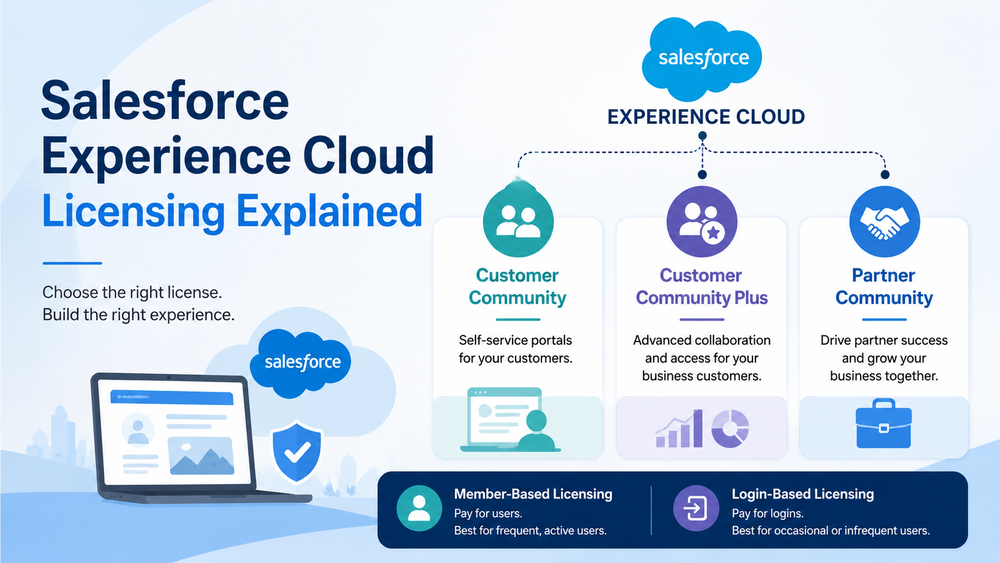
What Is Salesforce Experience Cloud Licensing?
Salesforce Experience Cloud allows organizations to create digital experiences for customers, partners, suppliers, and other external users.
Because external users access Salesforce data, each user requires an appropriate Experience Cloud license.
Licensing determines:
- user access;
- available Salesforce objects;
- security and sharing capabilities;
- reporting functionality;
- collaboration features;
- scalability options.
Official Salesforce documentation
Understanding licensing is important because it directly impacts both functionality and cost.
Why Salesforce Experience Cloud Licensing Matters
Many organizations initially focus on portal design and user experience.
However, licensing decisions often have a bigger long-term impact.
Choosing the wrong license may result in:
- limited functionality;
- unexpected costs;
- migration projects later;
- security challenges;
- scalability issues.
For example, a company implementing a customer self-service portal may choose a Customer Community license. Later, the organization decides to introduce account-based collaboration and advanced sharing, requiring an upgrade to Customer Community Plus.
Planning ahead can help avoid these situations.
Main Salesforce Experience Cloud License Types
Salesforce offers several Experience Cloud license types designed for different use cases.
The most common options include:
- Customer Community
- Customer Community Plus
- Partner Community
- External Apps
Each license supports a different audience and business model.
Customer Community License
The Customer Community license is designed for organizations that want to provide customer self-service access.
Best For
- support portals;
- help centers;
- customer self-service experiences;
- knowledge base access;
- account information visibility.
Typical Features
Users can access:
- Cases;
- Knowledge Articles;
- Accounts;
- Contacts;
- Custom Objects.
Advantages
- cost-effective;
- supports large user populations;
- simple deployment model;
- ideal for customer support scenarios.
Common Use Cases
Organizations often use Customer Community licenses for:
- SaaS customer portals;
- customer support centers;
- service request portals;
- product documentation sites.
Before designing a portal, it’s important to understand the most common adoption challenges
If your primary goal is self-service rather than collaboration, Customer Community is often the best starting point.
Customer Community Plus License
Customer Community Plus builds on Customer Community by providing additional collaboration and sharing capabilities.
Best For
- business customers;
- account management portals;
- customer collaboration;
- advanced support experiences.
Additional Features
Compared to Customer Community, this license includes:
- reports;
- dashboards;
- advanced sharing;
- delegated administration;
- roles.
Advantages
- greater flexibility;
- improved data visibility;
- more advanced user management;
- stronger collaboration capabilities.
When to Choose Customer Community Plus
Consider Customer Community Plus when customers need:
- access to reports;
- access to dashboards;
- more sophisticated sharing models;
- account-based collaboration.
Many B2B organizations find Customer Community Plus to be a strong middle ground between basic customer access and full partner functionality.
Partner Community License
Partner Community licenses are designed for external organizations that participate in sales and revenue generation.
Unlike customer-focused licenses, Partner Community users often require deeper CRM access.
Best For
- resellers;
- distributors;
- affiliates;
- franchisees;
- implementation partners.
Key Features
Partner Community users can access:
- Leads;
- Opportunities;
- Campaigns;
- Reports;
- Dashboards;
- Cases;
- Knowledge Articles.
Common Partner Portal Capabilities
Many organizations use Partner Community licenses for:
- lead sharing;
- opportunity management;
- deal registration;
- partner onboarding;
- channel sales;
- partner enablement.
Typical Use Cases
Organizations commonly use Partner Community for:
- partner portals;
- channel ecosystems;
- distributor networks;
- reseller programs.
For many companies, Partner Community becomes the foundation of a comprehensive partner relationship management strategy.
External Apps License
External Apps licenses are designed for organizations building custom applications on Salesforce.
Unlike Customer Community and Partner Community licenses, External Apps focus on application access rather than traditional portal experiences.
Best For
- supplier portals;
- vendor portals;
- industry-specific applications;
- custom business workflows;
- external operational systems.
Advantages
- flexible access model;
- custom application support;
- broader solution possibilities.
External Apps may be the right choice when your external users need access to a custom business application rather than customer support or partner collaboration features.
Organizations often choose External Apps when they want to build highly specialized experiences that don’t fit traditional customer or partner portal models.
Member-Based vs Login-Based Licensing
One of the most important Salesforce Experience Cloud Licensing decisions involves choosing between Member-Based Licensing and Login-Based Licensing.
Member-Based Licensing
A member-based license is assigned to a specific user.
Organizations pay for named users regardless of login frequency.
Best For
- active users;
- partners;
- daily portal users;
- frequent collaboration.
Advantages
- predictable licensing model;
- easier capacity planning;
- ideal for users who access the portal regularly.
Login-Based Licensing
A login-based license charges based on monthly logins rather than assigned users.
Best For
- occasional users;
- large customer populations;
- seasonal access;
- infrequent portal usage.
Advantages
- lower costs for low-usage populations;
- flexibility for large audiences;
- cost-effective self-service scenarios.
Which Is Better?
There is no universal answer.
If users log in frequently, member-based licensing is often more cost-effective.
If users access the portal occasionally, login-based licensing can significantly reduce costs.
As a result, understanding user behavior is critical when planning Salesforce Experience Cloud Licensing.
Salesforce Experience Cloud Licensing Comparison
| Feature | Customer Community | Customer Community Plus | Partner Community |
|---|---|---|---|
| Cases | ✓ | ✓ | ✓ |
| Knowledge | ✓ | ✓ | ✓ |
| Reports | Limited | ✓ | ✓ |
| Dashboards | Limited | ✓ | ✓ |
| Leads | ✗ | ✗ | ✓ |
| Opportunities | ✗ | ✗ | ✓ |
| Advanced Sharing | ✗ | ✓ | ✓ |
| Roles | ✗ | ✓ | ✓ |
| Partner Management | ✗ | ✗ | ✓ |
| Channel Sales | ✗ | ✗ | ✓ |
This comparison highlights why selecting the right Salesforce Experience Cloud Licensing model is critical for functionality, collaboration, and long-term scalability.
Scalability Considerations
Licensing decisions should support future growth.
Many organizations choose a license based on current requirements and later discover that their portal needs have evolved.
When planning for scalability, consider:
- expected user growth;
- partner expansion;
- new customer segments;
- additional external audiences;
- future integrations;
- long-term operational costs.
Customer Community licenses are often ideal for large self-service populations.
Customer Community Plus and Partner Community provide more advanced capabilities but require additional planning around sharing models and role hierarchies.
A scalable licensing strategy can prevent costly redesigns and migrations in the future.
Common Salesforce Experience Cloud Licensing Mistakes
Choosing the Cheapest License
The lowest-cost option isn’t always the best value.
Organizations often spend more later when they need to upgrade functionality or redesign their portal architecture.
Ignoring Future Requirements
Portal requirements frequently evolve.
Think about where the business will be in two or three years, not just today.
Underestimating Growth
Licensing should support future user expansion.
Growth can significantly affect both licensing costs and platform architecture.
Selecting the Wrong User Model
Many organizations incorrectly choose Customer Community when Partner Community is required.
Understanding user behavior and business processes is critical before selecting licenses.
Not Considering Login-Based Licensing
For large customer populations, login-based licensing can dramatically reduce costs.
Yet many organizations overlook this option during planning.
How to Choose the Right Salesforce Experience Cloud License
Choose Customer Community If:
✓ your focus is customer self-service
✓ users primarily access support resources
✓ knowledge articles are important
✓ you expect a large user base
✓ support efficiency is a business priority
Choose Customer Community Plus If:
✓ customers require reports and dashboards
✓ advanced sharing is needed
✓ collaboration is important
✓ business customers need additional visibility
✓ account-based access is required
Choose Partner Community If:
✓ partners generate revenue
✓ opportunities are shared
✓ deal registration is required
✓ channel sales are important
✓ external users need CRM access
Consider External Apps If:
✓ you’re building a custom application
✓ users interact with specialized workflows
✓ your use case extends beyond traditional portal functionality
✓ customer and partner licenses do not fit your requirements
How Success Craft Can Help
Selecting the right Salesforce Experience Cloud Licensing model is only one part of a successful implementation.
Organizations must also consider:
- portal architecture;
- security design;
- sharing models;
- integrations;
- user experience;
- long-term scalability.
At Success Craft, we help organizations design and implement Experience Cloud solutions that align with business objectives while controlling licensing complexity and costs.
Learn more:
Salesforce Portals Development
Salesforce Consulting Services
Conclusion
Salesforce Experience Cloud Licensing affects far more than access to a portal.
It influences functionality, security, collaboration, scalability, and long-term costs.
Customer Community, Customer Community Plus, Partner Community, and External Apps licenses each serve different business needs.
The right license depends on your users, business processes, growth plans, and collaboration requirements.
Organizations that carefully evaluate Salesforce Experience Cloud Licensing early can avoid costly migrations, reduce implementation risks, and create digital experiences that continue to scale as the business grows.
By understanding the strengths and limitations of each license type, you’ll be better positioned to build an Experience Cloud solution that delivers long-term value.
What is Salesforce Experience Cloud Licensing?
Salesforce Experience Cloud Licensing determines how external users access Salesforce data, applications, and digital experiences. Different license types provide different levels of functionality, collaboration, and access.
What is the difference between Customer Community and Partner Community licenses?
Customer Community licenses are designed for customer self-service and support scenarios, while Partner Community licenses provide access to CRM features such as leads, opportunities, deal registration, and partner collaboration tools.
What is Customer Community Plus?
Customer Community Plus is an enhanced Experience Cloud license that includes advanced sharing, roles, reports, dashboards, and delegated administration capabilities.
What is the difference between member-based and login-based licensing?
Member-based licensing assigns a license to a specific user, while login-based licensing charges based on monthly logins. Login-based licensing is often more cost-effective for large groups of occasional users.
How do I choose the right Salesforce Experience Cloud license?
The right license depends on your users, business processes, collaboration requirements, security needs, and growth plans. Evaluating these factors early helps avoid costly licensing changes later.