

Salesforce Flow Limitations: When Automation Becomes Too Complex
Salesforce Flow limitations become increasingly visible as Salesforce environments grow more complex. While Salesforce Flow has become the platform’s primary low-code automation framework, many organizations eventually encounter scalability, governance, performance, and maintainability challenges as automation ecosystems expand.
Flow is extremely powerful for operational automation and rapid business process implementation. However, enterprise environments often introduce:
- large transaction volumes;
- interconnected automations;
- complex integrations;
- asynchronous dependencies;
- advanced business logic;
- governance requirements.
As a result, automation that initially looks simple can gradually evolve into an operationally difficult and unstable environment.
Many organizations assume that low-code automation automatically reduces long-term complexity. In reality, poorly governed Flow ecosystems can create:
- recursive automation;
- debugging difficulties;
- performance bottlenecks;
- deployment risks;
- automation sprawl;
- operational instability.
The issue is not that Salesforce Flow is weak. The real challenge is that enterprise automation requires architecture thinking, governance, observability, and scalability planning.
In this guide, we explore:
- the most important Salesforce Flow limitations;
- common scalability challenges;
- governance and debugging problems;
- signs your automation environment is becoming unstable;
- when Apex becomes the better solution;
- how enterprise teams build sustainable automation architectures.
What Salesforce Flow Does Well
Before discussing Salesforce Flow limitations, it is important to understand why Flow became Salesforce’s primary automation framework in the first place.
Salesforce Flow allows organizations to automate processes using declarative low-code tools directly inside the platform. It enables teams to build workflows, automate record updates, create guided user experiences, and orchestrate operational processes without writing large amounts of custom code.
Official Salesforce Flow documentation
For many organizations, Flow significantly improves:
- implementation speed;
- operational agility;
- admin productivity;
- automation accessibility.
Flow is especially effective for:
- approval routing;
- notifications;
- onboarding processes;
- guided screens;
- simple record automation;
- lightweight orchestration.
In smaller and moderately complex environments, Flow often provides the right balance between flexibility, speed, and maintainability.
Understanding Salesforce Flow Limitations
As organizations scale their Salesforce ecosystems, automation environments naturally become more interconnected. This is where many Salesforce Flow limitations begin to appear.
The challenge is rarely caused by a single Flow. Problems usually emerge when organizations accumulate:
- dozens of automations;
- overlapping logic;
- recursive execution paths;
- unmanaged dependencies;
- disconnected ownership across teams.
Without architecture standards and governance processes, Flow environments can gradually become difficult to scale and maintain.
Scalability Challenges in Salesforce Flow
Transaction Complexity
One of the most common Salesforce Flow limitations involves transaction complexity.
As organizations add more automations, a single record update may trigger:
- multiple Flows;
- validation rules;
- Apex triggers;
- integrations;
- asynchronous processes.
Over time, execution chains become increasingly difficult to predict.
This often creates:
- longer transaction times;
- governor limit issues;
- recursive automation behavior;
- operational instability.
Enterprise environments with heavy automation frequently experience performance degradation when declarative logic grows without centralized governance.
Large Data Volume Processing
Flow can struggle in environments with:
- large data volumes;
- heavy batch operations;
- high-frequency updates;
- complex orchestration requirements.
As transaction volume increases, organizations may encounter:
- CPU time limit issues;
- query limitations;
- delayed execution;
- failed transactions.
In large enterprise ecosystems, performance optimization becomes significantly more important than implementation speed alone.
Recursive Automation Risks
Recursive automation is one of the most difficult operational problems in large Flow environments.
For example:
- one Flow updates a record;
- another automation reacts to that update;
- additional Flows continue triggering downstream logic.
As automation dependencies increase, organizations often create execution loops that are difficult to detect and troubleshoot.
This is one of the biggest reasons why enterprise Salesforce automation requires strong governance and architecture planning.
Debugging and Troubleshooting Limitations
Limited Operational Visibility
One of the most important Salesforce Flow limitations is limited observability in large automation environments.
As Flow ecosystems scale, organizations often struggle to identify:
- where failures originate;
- which automation caused an issue;
- why transactions fail intermittently;
- how dependencies interact across systems.
Unlike mature software engineering environments, declarative automation can become difficult to trace once complexity increases.
Difficult Root-Cause Analysis
Large interconnected Flow environments may contain:
- nested automations;
- asynchronous execution;
- hidden dependencies;
- overlapping record-triggered logic.
As a result, troubleshooting becomes increasingly time-consuming.
Many enterprise teams underestimate how difficult it becomes to maintain operational visibility once automation ecosystems scale beyond a moderate level of complexity.
Silent Automation Failures
Some automation failures are immediately visible. Others remain undetected for long periods.
Organizations frequently encounter:
- partial synchronization failures;
- delayed automation execution;
- incomplete updates;
- inconsistent records.
Without monitoring and observability, these issues may silently affect operations before teams detect them.
This is why automation observability is becoming increasingly important in enterprise Salesforce environments.
Salesforce Flow Governance Challenges
Automation Sprawl
One of the most common enterprise problems is automation sprawl.
Over time, organizations often accumulate:
- overlapping Flows;
- duplicated business logic;
- inconsistent naming conventions;
- disconnected ownership;
- outdated automation versions.
Without governance standards, Flow ecosystems gradually become difficult to maintain.
Multiple Active Flow Versions
Large organizations frequently struggle with:
- multiple active versions;
- inconsistent deployments;
- testing difficulties;
- release coordination challenges.
This becomes especially problematic in environments with:
- multiple admins;
- multiple development teams;
- CI/CD pipelines;
- enterprise release processes.
As deployment complexity grows, automation governance becomes just as important as automation itself.
Lack of Centralized Architecture
Many organizations initially build Flow automation quickly without defining:
- architecture standards;
- ownership models;
- documentation practices;
- scalability guidelines.
The result is often a fragmented automation ecosystem that becomes increasingly unstable as the business evolves.
Performance Limitations of Salesforce Flow
Governor Limits
Although Flow simplifies automation development, it still operates within Salesforce governor limits.
Organizations may encounter issues related to:
- CPU time;
- SOQL limits;
- DML operations;
- transaction size;
- execution time.
Official Salesforce governor limits documentation
As automation environments scale, these limits become increasingly important.
Heavy Synchronous Processing
Too much synchronous automation can slow down:
- user operations;
- page performance;
- record updates;
- integrations.
Enterprise automation often requires asynchronous processing strategies to maintain operational stability.
Integration Complexity
Flow works well for lightweight integrations, but highly interconnected enterprise systems often require:
- advanced orchestration;
- retry mechanisms;
- queue management;
- complex error handling;
- scalable asynchronous architecture.
These scenarios frequently exceed what declarative automation can reliably manage long term.
When Salesforce Flow Becomes Too Complex
Signs Your Automation Environment Is Becoming Unstable
Organizations should evaluate their automation architecture when they begin experiencing:
- slow transaction performance;
- recursive execution issues;
- deployment instability;
- difficult debugging;
- inconsistent automation behavior;
- increasing maintenance overhead.
These are often signs that automation complexity has outgrown the original architecture.
Enterprise Automation Requirements
As business ecosystems grow, organizations often require:
- centralized governance;
- reusable services;
- asynchronous processing;
- advanced integrations;
- stronger observability;
- scalable orchestration patterns.
This is where hybrid automation strategies become significantly more effective.
When Apex Is the Better Option
Scenarios Better Suited for Apex
Apex is often the better choice for:
- complex business logic;
- enterprise integrations;
- large-scale data processing;
- asynchronous operations;
- reusable architecture;
- advanced orchestration.
Unlike Flow, Apex provides greater control over:
- transaction management;
- performance optimization;
- debugging;
- reusable services;
- operational observability.
Hybrid Automation Strategies
In mature Salesforce environments, the best solution is often a hybrid automation architecture.
Organizations commonly use:
- Flow for orchestration and user interaction;
- Apex for heavy processing and reusable logic.
This approach helps organizations balance:
- operational flexibility;
- maintainability;
- enterprise scalability;
- governance requirements.
Related article:
Salesforce Flow vs Apex: When to Use Each Approach
Best Practices for Sustainable Salesforce Automation
Build Modular Automation
Organizations should design automation using:
- reusable subflows;
- separation of concerns;
- centralized logic;
- clear ownership models.
Modular automation environments are significantly easier to scale and maintain.
Improve Governance
Strong governance should include:
- naming conventions;
- documentation standards;
- deployment processes;
- architecture reviews;
- operational monitoring.
Governance becomes increasingly important as automation ecosystems evolve.
Improve Observability
Enterprise teams should maintain visibility into:
- Flow execution;
- transaction failures;
- performance bottlenecks;
- automation dependencies;
- integration behavior.
Without observability, automation environments become difficult to operate reliably at scale.
How Success Craft Helps Stabilize Salesforce Automation
Success Craft helps organizations design scalable Salesforce automation architectures that remain maintainable and operationally reliable as complexity grows.
Our expertise includes:
- Salesforce Flow optimization;
- Apex development;
- enterprise automation governance;
- integration architecture;
- performance optimization;
- hybrid Flow + Apex strategies.
We help businesses:
- reduce automation complexity;
- improve operational stability;
- optimize enterprise automation performance;
- stabilize large Salesforce ecosystems;
- improve observability and governance.
Many organizations initially prioritize rapid automation delivery but later struggle with operational complexity as automation environments scale. Success Craft helps companies build Salesforce architectures that remain scalable, maintainable, observable, and resilient over time.
Related services:
Final Thoughts
Salesforce Flow is one of the most powerful automation tools in the Salesforce ecosystem. However, understanding Salesforce Flow limitations is essential for building sustainable enterprise architectures.
Low-code automation does not eliminate architectural complexity. As organizations scale, automation ecosystems require:
- governance;
- observability;
- scalability planning;
- operational monitoring;
- long-term maintainability strategies.
Flow works extremely well for many operational business processes. But highly interconnected enterprise environments often require hybrid architectures that combine declarative automation with Apex-based enterprise logic.
In modern Salesforce ecosystems, the long-term success of automation depends not only on implementation speed, but also on operational stability, scalability, governance, and architectural discipline.
What are the limitations of Salesforce Flow?
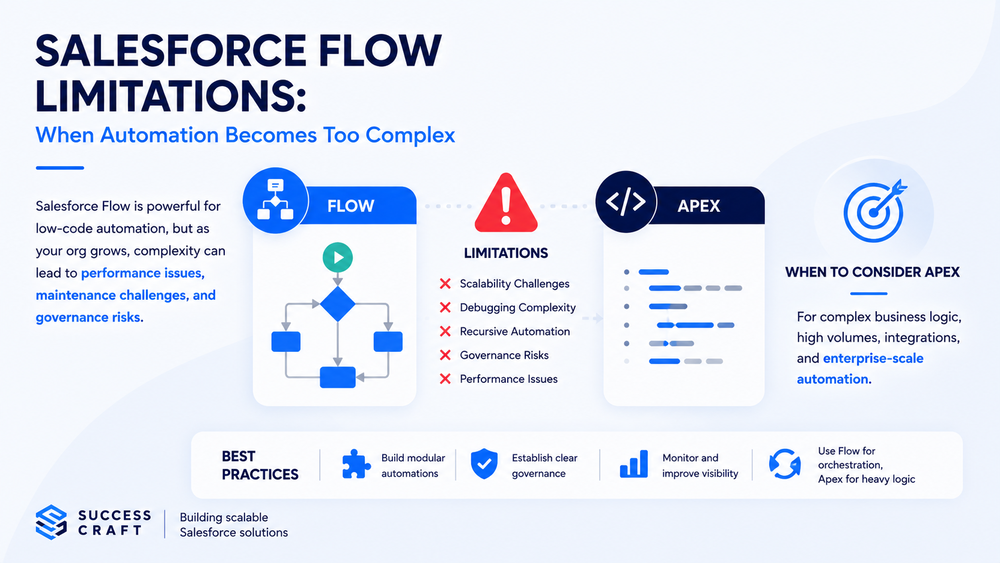
Salesforce Flow limitations include scalability challenges, recursive automation risks, debugging complexity, governance issues, and performance bottlenecks in large enterprise environments.
What are the limitations of Salesforce Flow?
Salesforce Flow limitations include scalability challenges, recursive automation risks, debugging complexity, governance issues, and performance bottlenecks in large enterprise environments.
What are the limitations of Salesforce Flow?
Salesforce Flow limitations include scalability challenges, recursive automation risks, debugging complexity, governance issues, and performance bottlenecks in large enterprise environments.
Can Salesforce Flow handle enterprise automation?
Yes, but enterprise environments usually require strong governance, observability, architecture planning, and often hybrid Flow + Apex strategies.
How do you optimize Salesforce Flow performance?
Organizations can improve Flow performance by reducing transaction complexity, avoiding recursion, improving governance, modularizing automation, and using Apex where appropriate.