

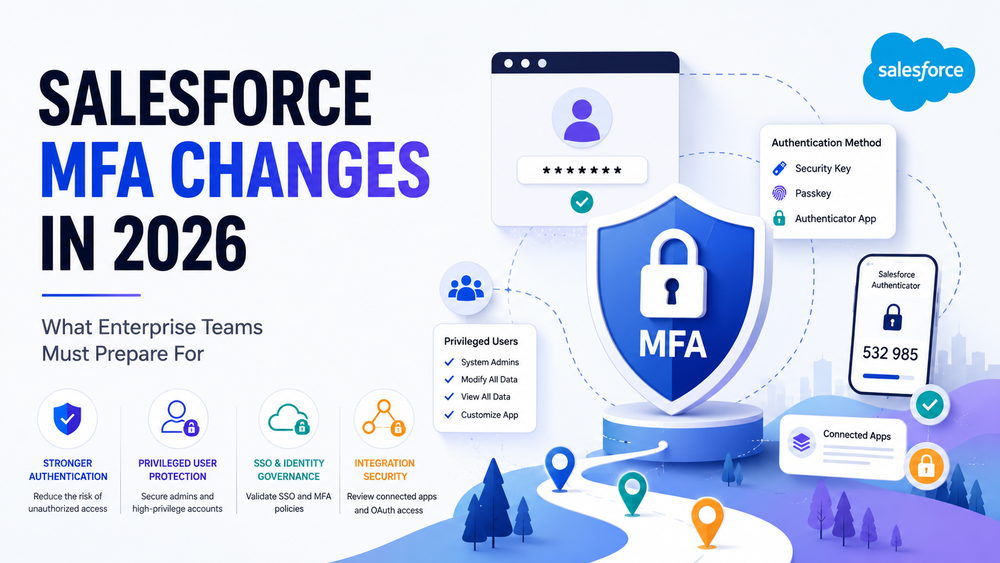
Salesforce MFA Changes in 2026: What Enterprise Teams Must Prepare For
Salesforce continues to strengthen its security posture, and one of the most important topics for organizations in 2026 is the evolution of multi-factor authentication (MFA) requirements.
For many companies, MFA is already enabled. However, the latest Salesforce initiatives go beyond simply turning on an additional authentication factor. Organizations are now expected to adopt stronger identity controls, improve privileged user protection, validate authentication flows, and ensure that MFA policies are consistently enforced across their Salesforce environments.
As Salesforce security requirements continue to evolve, enterprise teams should review their current authentication strategy, assess risks, and identify gaps before they become operational or compliance challenges.
In this guide, we’ll explain what is changing, who is affected, and what organizations should do now to prepare.
Official Salesforce guidance:
Salesforce MFA Requirements and Security Updates
Why Salesforce Continues to Strengthen MFA Requirements
Identity-related attacks remain one of the most common causes of security incidents across SaaS platforms.
Attackers increasingly target:
- passwords;
- session cookies;
- privileged accounts;
- identity providers;
- authentication workflows.
A compromised Salesforce account can potentially provide access to:
- customer records;
- reports;
- business processes;
- integrations;
- sensitive company data.
Because of this, Salesforce continues investing in stronger authentication controls and identity verification mechanisms.
The goal is straightforward:
Reduce the risk of unauthorized access caused by stolen credentials and weak authentication practices.
For enterprise organizations, this means authentication security is becoming a core part of Salesforce governance rather than a simple IT configuration.
What Is Changing in 2026?
Salesforce is placing increased emphasis on MFA adoption, authentication assurance, and stronger protection for privileged users.
Enterprise teams should expect greater focus on:
- MFA enforcement;
- identity governance;
- privileged account protection;
- phishing-resistant authentication;
- SSO validation;
- authentication policy reviews.
While many organizations already use MFA, Salesforce increasingly expects companies to validate that MFA is implemented correctly and consistently.
The biggest misconception is:
“We enabled MFA years ago, so we’re done.”
In reality, many organizations still have:
- inconsistent enforcement;
- privileged users without stronger authentication;
- legacy login processes;
- poorly documented identity controls.
The 2026 changes are an opportunity to review and improve these areas.
For additional context:
How to Prepare for Salesforce’s Mandatory MFA Changes in 2026
Who Is Affected?
Internal Salesforce Users
The primary audience impacted by Salesforce MFA requirements includes internal users:
- Salesforce Administrators;
- Developers;
- Sales teams;
- Customer Success teams;
- Operations teams;
- Executives and managers.
Organizations should ensure that all users authenticate using approved MFA methods and that authentication policies are enforced consistently.
Privileged Users and Administrators
Privileged users deserve special attention.
These include users with permissions such as:
- System Administrator;
- Modify All Data;
- View All Data;
- Customize Application;
- Author Apex.
These accounts represent a higher level of risk because they can access large volumes of data or make critical system changes.
For enterprise teams:
Administrator accounts should be reviewed separately as part of MFA readiness planning.
Organizations should verify:
- authentication methods;
- permission assignments;
- access necessity;
- privileged account inventory.
What Is Phishing-Resistant MFA?
One of the most important security topics surrounding Salesforce MFA changes is phishing-resistant MFA.
Traditional MFA significantly improves security, but some methods can still be targeted through sophisticated phishing attacks.
Phishing-resistant MFA provides stronger protection by preventing attackers from reusing authentication credentials.
Examples include:
- Security Keys;
- Passkeys;
- Windows Hello;
- Touch ID;
- WebAuthn authenticators;
- Platform authenticators.
These methods create a stronger level of identity assurance compared to traditional SMS or one-time code approaches.
For organizations managing sensitive customer data or highly privileged users, phishing-resistant MFA should be part of long-term security planning.
What About Organizations Using SSO?
Many companies assume:
“We use Okta or Microsoft Entra ID, so we’re automatically compliant.”
Not necessarily.
Single Sign-On (SSO) and MFA are related, but they are not the same thing.
Organizations using:
- Okta;
- Microsoft Entra ID (Azure AD);
- Ping Identity;
- other identity providers;
should verify that MFA is actually enforced through the identity provider and that Salesforce receives the appropriate authentication assurance.
In practice:
SSO does not automatically mean MFA compliance.
This is one of the most common findings during Salesforce security reviews.
Enterprise teams should validate:
- MFA policies at the IdP level;
- conditional access rules;
- authentication flows;
- exception handling;
- contractor access.
What About Experience Cloud Users?
Another area that often causes confusion is Experience Cloud.
Organizations frequently ask:
“Do the same MFA requirements apply to customers and partners?”
The answer depends on how Experience Cloud is configured.
Internal employee users and external users are managed differently.
Organizations should review:
- partner communities;
- customer portals;
- external identities;
- authentication policies for external users.
The key point is:
MFA strategy should include both internal and external user populations, but the implementation approach may differ.
This becomes especially important for organizations operating customer-facing portals, partner ecosystems, or large-scale Experience Cloud deployments.
Common MFA Misconceptions
“MFA Solves All Security Problems”
It does not.
MFA strengthens authentication, but it does not address:
- excessive permissions;
- connected app risks;
- OAuth governance;
- stale integrations;
- poor access management.
Authentication is only one layer of a broader Salesforce security strategy.
“MFA Protects Connected Apps”
This is one of the most common misunderstandings.
MFA protects authentication.
Connected apps primarily rely on OAuth authorization.
These are different security controls.
Even after implementing MFA, organizations should continue reviewing:
- connected app permissions;
- OAuth scopes;
- delegated access;
- integration ownership;
- authorization policies.
For deeper guidance, see:
Salesforce Security Changes and Existing Integrations
How to Audit Salesforce Connected Apps After Security Changes
MFA protects user logins. OAuth governance protects integrations.
Both are required.
Review Service Accounts and Integration Users
Many organizations focus on employees while forgetting service accounts.
This is a mistake.
Before MFA-related reviews, identify:
- integration users;
- middleware accounts;
- automation users;
- API users;
- CI/CD accounts.
Questions worth asking include:
- Who owns this account?
- Is it still needed?
- What systems depend on it?
- How is authentication managed?
- Does the account have excessive permissions?
Enterprise environments often accumulate integration accounts over many years.
As a result:
service accounts frequently become one of the largest unmanaged security risks
A complete MFA readiness assessment should always include integration and automation users.
How Enterprise Teams Should Prepare
Organizations should approach MFA readiness as a structured project.
Step 1: Inventory Authentication Methods
Document:
- user populations;
- authentication methods;
- SSO providers;
- MFA adoption levels.
Look for inconsistencies across departments and business units.
Step 2: Review Privileged Access
Create a complete inventory of:
- administrators;
- architects;
- developers;
- support teams;
- users with elevated permissions.
Verify that access remains justified.
Step 3: Validate SSO Configuration
If Salesforce relies on an identity provider:
- review MFA enforcement;
- validate conditional access policies;
- test authentication flows;
- review exception processes.
Many organizations discover gaps at this stage.
Step 4: Assess External Users
Review:
- Experience Cloud users;
- partner users;
- customer users;
- external authentication methods.
External access should be part of overall identity governance.
Step 5: Review Integrations and Connected Apps
While MFA protects authentication, organizations should also review OAuth-based access.
Recommended resources:
Salesforce Connected App Security Audit Checklist for Enterprise Teams
Salesforce Connected App Permissions Best Practices for Teams
Questions to ask:
- Which connected apps are active?
- What permissions do they have?
- Are permissions excessive?
- Who owns the integration?
- Is delegated access still required?
Step 6: Create a User Communication Plan
Security projects often fail because users are unprepared.
Before major MFA initiatives:
- communicate timelines;
- explain authentication methods;
- provide training materials;
- prepare support resources.
A smooth rollout significantly reduces adoption issues.
How Success Craft Helps
At Success Craft, we help organizations strengthen Salesforce security through:
- MFA readiness assessments;
- identity and access reviews;
- Salesforce security consulting;
- connected app audits;
- OAuth governance reviews;
- integration security assessments.
Our approach focuses on helping enterprise teams build sustainable security processes rather than one-time compliance exercises.
Whether organizations are preparing for MFA-related changes, reviewing privileged access, or improving integration governance, preparation and visibility remain critical.
Final Thoughts
The Salesforce MFA changes in 2026 represent more than another security requirement.
They reflect a broader industry shift toward stronger identity protection and authentication governance.
Organizations that prepare early can:
- reduce security risks;
- improve compliance readiness;
- strengthen privileged account protection;
- improve visibility into authentication processes;
- support users more effectively.
Most importantly:
MFA should be treated as part of a broader Salesforce security strategy, not as a standalone project.
The strongest organizations combine authentication security, identity governance, access reviews, and integration governance into a single security framework.
Is MFA mandatory for Salesforce users?
Salesforce continues to expand MFA-related requirements and strongly recommends MFA for internal users. Organizations should review current Salesforce guidance and enforcement policies.
Does MFA affect connected apps?
No. Connected apps typically use OAuth authorization rather than interactive user authentication. MFA and OAuth governance address different security areas.
Does SSO automatically satisfy Salesforce MFA requirements?
Not always. Organizations should verify that MFA is enforced through their identity provider and that Salesforce receives appropriate authentication assurance.
What is phishing-resistant MFA?
Phishing-resistant MFA includes authentication methods such as security keys, passkeys, Windows Hello, Touch ID, and WebAuthn authenticators that help prevent credential theft through phishing attacks.
How should enterprise organizations prepare for Salesforce MFA changes?
Organizations should review authentication methods, validate SSO configurations, assess privileged accounts, review service accounts, evaluate connected apps, and create user communication plans.