

Salesforce Composite API: Complete Guide with Best Practices
Modern Salesforce integrations rarely consist of a single API request. A typical business process may involve creating an Account, adding Contacts, opening an Opportunity, updating related records, and retrieving additional data before the transaction is complete. Executing every operation as an individual REST request increases network latency, consumes more API calls, and adds unnecessary complexity to integration logic.
Salesforce Composite API addresses these challenges by allowing multiple REST operations to be combined into a single HTTP request. It reduces round trips between systems, supports dependent operations, and simplifies complex workflows without requiring additional orchestration from the client application.
Whether you’re building middleware, integrating third-party systems, developing mobile applications, or extending Experience Cloud, understanding Composite API can help you create faster, cleaner, and more scalable integrations.
In this guide, you’ll learn how Salesforce Composite API works, explore the different Composite Resources available in the Salesforce REST API, and discover best practices for designing efficient enterprise integrations.
If you’re new to Salesforce APIs, start with our Salesforce REST API Best Practices guide.
To learn how to secure your API integrations, read our Salesforce OAuth 2.0 Best Practices guide.
What Is Salesforce Composite API?
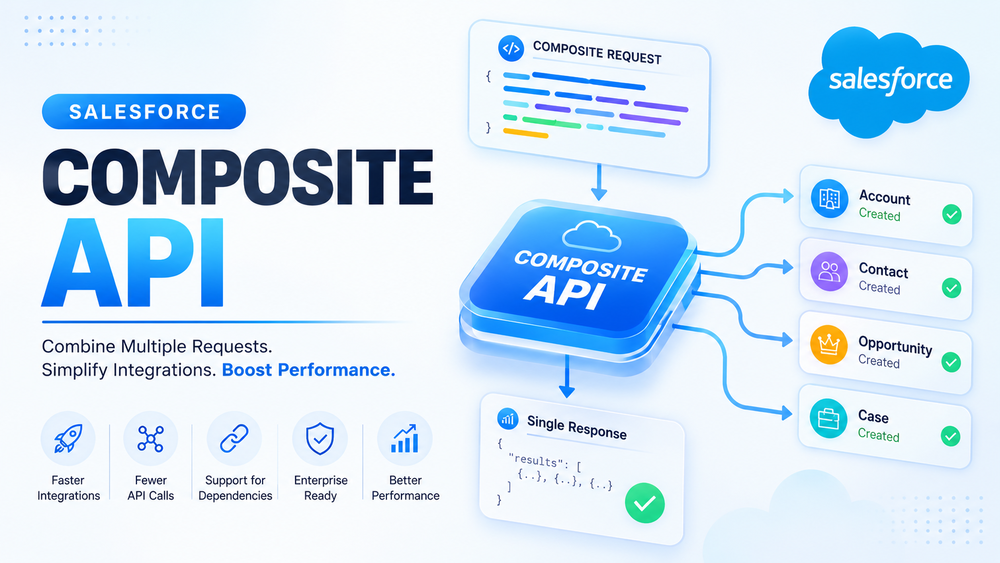
Salesforce Composite API is one of several Composite Resources available within the Salesforce REST API. It enables multiple REST API operations to be executed within a single HTTP request while supporting dependencies between individual operations.
Instead of sending several separate requests, an application submits a single Composite request containing multiple subrequests. Salesforce processes each subrequest and returns one consolidated response.
One of Composite API’s biggest advantages is its ability to reference the results of previous operations. For example, a newly created Account ID can immediately be used to create a related Contact or Opportunity without requiring another API call.
A single Composite request can perform operations such as:
- creating records;
- updating existing records;
- retrieving Salesforce data;
- deleting records;
- executing dependent business workflows.
This makes Composite API particularly valuable for integrations where multiple Salesforce objects must be processed together.
Salesforce documents Composite API as part of its REST API framework
Why Use Salesforce Composite API?
Without Composite API, applications often perform several consecutive REST requests to complete one business transaction.
For example:
Create Account
      ↓
Create Contact
      ↓
Create Opportunity
      ↓
Create Case
Each request requires:
- a separate HTTP connection;
- additional network latency;
- authentication;
- response processing;
- client-side orchestration.
Composite API combines these operations into one request, reducing communication overhead while simplifying integration logic.
Key benefits include:
- fewer HTTP requests;
- reduced network latency;
- fewer API round trips;
- support for dependent requests;
- simpler application code;
- improved performance for multi-step workflows.
REST API vs Composite API
| Traditional REST API | Salesforce Composite API |
|---|---|
| Multiple HTTP requests | Single HTTP request |
| Multiple responses | One consolidated response |
| Manual orchestration | Built-in request orchestration |
| Higher latency | Lower latency |
| Independent operations | Supports dependencies |
Composite API is especially useful for customer onboarding, CRM synchronization, middleware platforms, and Experience Cloud applications.
How Salesforce Composite API Works
A Composite request contains an array called compositeRequest. Each element in the array represents an individual REST API operation.
Every subrequest includes:
- HTTP method;
- REST endpoint;
- request body (if required);
- unique referenceId.
Salesforce executes these operations and returns a single compositeResponse containing the result of every subrequest.
The process looks like this:
Application
      │
      ▼
Composite Request
      │
      ▼
Salesforce
      │
 ┌────┼────┐
 ▼    ▼    ▼
Req1 Req2 Req3
      │
      ▼
Single Composite Response
Unlike standard REST requests, Composite API allows later subrequests to reference values returned by earlier ones. This removes the need to stop execution, retrieve record IDs, and send additional requests.
Learn more about Composite Requests
Composite Resources Overview
Composite API belongs to a broader family of Composite Resources available within the Salesforce REST API. Each resource is designed for a different integration scenario.
Composite API
The standard Composite API supports dependent requests through Reference IDs, making it the preferred option for multi-step business workflows.
Typical use cases include:
- customer onboarding;
- creating related records;
- transactional business processes.
Batch API
Batch API executes multiple independent REST requests within a single HTTP request.
Unlike Composite API, Batch requests cannot share data or reference one another.
Best suited for:
- unrelated CRUD operations;
- independent API calls.
Tree API
Tree API is optimized for creating hierarchical records within a single request.
Typical examples include:
- Account → Contacts
- Account → Cases
- Account → Opportunities
Collections API
Collections API performs CRUD operations on multiple records of the same object type within one request.
Unlike Bulk API, it is intended for smaller groups of records rather than large-scale data processing.
Composite Graph API
Composite Graph builds upon Composite API by supporting up to 500 subrequests across one or more graphs. It is designed for large enterprise workflows involving numerous related operations and complex dependencies.
Choosing the Right Composite Resource
| Resource | Supports Dependencies | Best Use Case |
|---|---|---|
| Composite API | ✔ | Multi-step business workflows |
| Batch API | ✖ | Independent requests |
| Tree API | Parent-child only | Hierarchical record creation |
| Collections API | ✖ | CRUD operations on multiple records |
| Composite Graph API | ✔ | Large enterprise workflows |
Selecting the appropriate Composite Resource helps improve performance while keeping integrations easier to maintain.
Understanding Reference IDs
Reference IDs are one of the most powerful features of Salesforce Composite API.
Every subrequest includes a unique referenceId, allowing later operations to reuse values returned by previous requests.
For example:
- Create an Account.
- Salesforce returns the Account ID.
- Create a Contact.
- Use the Account ID from the previous response instead of performing another query.
This approach reduces unnecessary API calls while keeping the entire workflow inside a single Composite request.
Reference IDs are commonly used for:
- creating related records;
- building multi-step workflows;
- reducing application complexity;
- improving performance.
Composite API Request Structure
Every Composite request is sent as a JSON payload containing one or more subrequests.
The most important elements are:
- compositeRequest — list of API operations;
- referenceId — unique identifier for each subrequest;
- method — HTTP method;
- url — Salesforce REST endpoint;
- body — request payload;
- allOrNone — rolls back all successful subrequests if one operation fails;
- collateSubrequests — allows Salesforce to optimize independent subrequests when execution order is not important.
A simplified request looks like this:
{
  "allOrNone": false,
  "compositeRequest": [
    {
      "method": "POST",
      "url": "/services/data/vXX.X/sobjects/Account",
      "referenceId": "NewAccount",
      "body": {
        "Name": "Acme Corporation"
      }
    }
  ]
}
Understanding these components is essential before implementing more advanced Composite API workflows involving dependent requests, transaction management, and error handling.
Official request documentation
Composite API Response Structure
After Salesforce executes a Composite request, it returns a single JSON response containing the result of every subrequest.
Each item in the compositeResponse includes:
- referenceId — identifies the corresponding subrequest;
- httpStatusCode — the HTTP status code for that operation;
- body — returned data or error information;
- httpHeaders — response headers when applicable.
Unlike a standard REST API request, where only one operation is returned, Composite API allows applications to evaluate the outcome of multiple operations from a single response.
It’s important to note that each subrequest has its own status code. Even if the overall Composite request returns HTTP 200, individual subrequests may still fail. Applications should always inspect each subresponse rather than relying solely on the overall response status.
Salesforce Composite API Limits
Composite API is designed for transactional business workflows rather than large-scale data processing.
Some of the most important limits include:
| Limit | Value |
|---|---|
| Maximum subrequests | 25 |
| Maximum Query, QueryAll, and SObject Collection requests | 5 |
| Counts toward daily API limits | Yes |
| Nested Composite requests | Not supported |
| Supports dependent requests | Yes |
Additional considerations:
- Large payloads may increase processing time.
- Each subrequest is evaluated individually.
- Very large data loads should use Bulk API.
- Complex integrations should be divided into logical business transactions rather than oversized Composite requests.
Understanding these limits helps build scalable integrations while avoiding unnecessary performance issues.
Salesforce Composite API Best Practices
Using Composite API effectively requires more than simply combining multiple requests. Following these best practices helps improve performance, simplify maintenance, and reduce integration errors.
Group Related Operations
Use Composite API for operations that belong to the same business process.
For example:
- Create Account
- Create Contact
- Create Opportunity
Grouping unrelated requests together makes integrations harder to understand and maintain.
Use Reference IDs Instead of Additional Queries
Whenever one operation depends on another, reuse data through referenceId instead of sending additional API requests.
This reduces:
- network traffic;
- API consumption;
- application complexity.
Keep Payloads Small
Although Composite API supports multiple subrequests, avoid creating oversized payloads.
Smaller requests are:
- easier to debug;
- easier to retry;
- faster to process;
- simpler to maintain.
Configure allOrNone Carefully
The allOrNone parameter controls transaction behavior.
When set to true, Salesforce rolls back all successful subrequests if any operation fails.
When set to false, successful operations are committed even when individual subrequests fail.
Choose the option that matches your business requirements.
Use collateSubrequests Appropriately
For independent operations, collateSubrequests allows Salesforce to optimize internal request processing.
This option can improve performance but should only be used when execution order does not matter.
Secure Composite API with OAuth 2.0
Every Composite API integration should use modern authentication.
Salesforce recommends OAuth 2.0 instead of username-password authentication.
Learn more in our Salesforce OAuth 2.0 Best Practices guide.
Monitor API Usage
Regularly monitor:
- API usage;
- Event Monitoring;
- Login History;
- Event Log Files;
- Connected Apps.
Monitoring helps identify inefficient integrations before they become production issues.
Common Composite API Mistakes
Even well-designed integrations can become inefficient if Composite API is used incorrectly.
| Common Mistake | Better Approach |
|---|---|
| Using Composite API for every REST request | Use Composite only for related workflows |
| Using Composite API for a single CRUD operation | Use REST API |
| Using Composite API for large data migrations | Use Bulk API |
| Ignoring partial failures | Validate every subresponse |
| Hardcoding record IDs | Use Reference IDs |
| Creating oversized payloads | Split requests into logical business transactions |
Avoiding these mistakes improves maintainability and simplifies troubleshooting.
Composite API vs Other Salesforce APIs
Salesforce provides several APIs, each optimized for different integration scenarios.
| API | Best For | Supports Dependencies |
|---|---|---|
| REST API | Simple CRUD operations | ✖ |
| Composite API | Multi-step business workflows | ✔ |
| Bulk API | Large-volume data processing | ✖ |
| GraphQL API | Flexible data retrieval | ✖ |
| SOAP API | Legacy enterprise integrations | Limited |
Selecting the appropriate API often has a greater impact on performance than optimizing request payloads alone.
When Should You Use Salesforce Composite API?
Composite API is recommended when multiple related operations need to execute as part of a single business transaction.
Typical scenarios include:
- customer onboarding;
- creating Accounts, Contacts, and Opportunities together;
- Experience Cloud registration workflows;
- middleware integrations;
- mobile applications;
- external business systems.
When Not to Use Composite API
Composite API is not the best choice for every integration.
Instead, consider:
| Scenario | Recommended Alternative |
|---|---|
| Millions of records | Bulk API |
| Data migration | Bulk API |
| Event-driven integrations | Platform Events or Change Data Capture |
| Single CRUD operation | REST API |
| Flexible client-side queries | GraphQL API |
Choosing the right API simplifies implementation and improves long-term scalability.
How Success Craft Can Help
At Success Craft, we help organizations design secure and scalable Salesforce integrations tailored to their business requirements.
Our expertise includes:
- Salesforce API integrations;
- Composite API implementation;
- enterprise integration architecture;
- performance optimization;
- Salesforce consulting.
Conclusion
Salesforce Composite API enables multiple REST operations to be executed within a single HTTP request, reducing network latency and simplifying complex integration workflows.
By understanding the differences between Composite Resources, using Reference IDs effectively, following transaction management best practices, and selecting the right API for each use case, organizations can build integrations that are both scalable and maintainable.
Whether you’re developing middleware, mobile applications, or enterprise integrations, Composite API provides an efficient way to reduce API traffic while improving the performance of multi-step business processes.
What is Salesforce Composite API?
Salesforce Composite API is a Composite Resource within the Salesforce REST API that allows multiple REST operations to be executed within a single HTTP request while supporting dependencies between subrequests.
What is the difference between Composite API and Batch API?
Composite API supports dependent requests through Reference IDs, while Batch API executes independent requests that cannot reference one another.
Does Salesforce Composite API count toward API limits?
Yes. Composite API requests count toward your organization’s daily Salesforce API limits, even though multiple operations are executed within a single HTTP request.
How many requests can Salesforce Composite API execute?
A Composite request supports up to 25 subrequests, including a maximum of 5 Query, QueryAll, or SObject Collection operations.
When should I use Composite API instead of REST API?
Use Composite API when multiple related operations belong to the same business process and need to execute together. For simple CRUD operations, the standard REST API is usually the better choice.