

Salesforce Record-Triggered Flow Best Practices
Salesforce Record-Triggered Flows have become the primary automation tool on the Salesforce platform. Following the retirement of Workflow Rules and Process Builder for new automation, Record-Triggered Flows are now Salesforce’s recommended declarative solution for automating record-based business processes.
When designed correctly, they provide fast, scalable, and maintainable automation. However, poor design decisions—such as unnecessary executions, duplicate logic, inefficient queries, or excessive DML operations—can lead to governor limit exceptions, slower record saves, and automation that becomes increasingly difficult to maintain.
The goal isn’t to build more Flows—it’s to build better Flows. This guide explains the most important Salesforce Record-Triggered Flow best practices to help administrators, developers, and architects create automation that remains reliable as business requirements evolve.
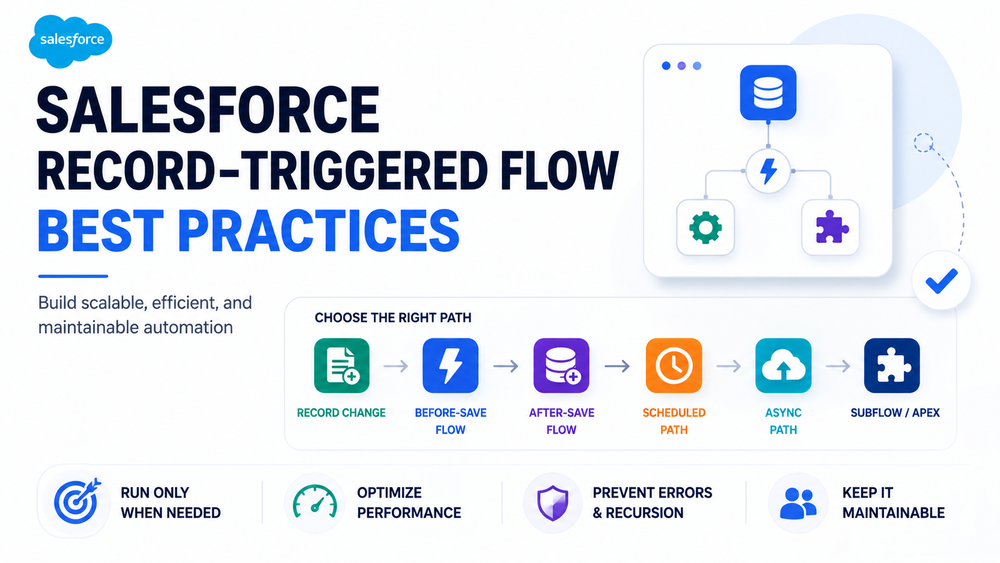
What Is a Record-Triggered Flow?
A Record-Triggered Flow automatically runs when a Salesforce record is created, updated, or deleted, depending on the selected trigger configuration.
It allows organizations to automate business processes without writing Apex code and is commonly used for:
- updating fields;
- creating related records;
- sending notifications;
- assigning tasks;
- launching approval processes;
- invoking Subflows;
- orchestrating business logic.
Unlike scheduled automation, Record-Triggered Flows execute as part of Salesforce transactions. Because of this, they should always be designed with performance, scalability, and governor limits in mind.
When Should You Use a Record-Triggered Flow?
A Record-Triggered Flow is the preferred choice whenever business logic begins with a record change.
Typical use cases include:
- updating Opportunity fields when the Stage changes;
- creating follow-up Tasks after a Case is closed;
- notifying Account Owners about important updates;
- creating related custom records;
- synchronizing information between related objects;
- launching additional Salesforce automation.
They replace many scenarios previously implemented with Workflow Rules and Process Builder, while providing significantly greater flexibility and control.
As a general guideline, if your automation starts because a Salesforce record changes, a Record-Triggered Flow should usually be your first option before considering Apex.
Understanding Record-Triggered Flow Execution Options
One of the biggest architectural mistakes is assuming every automation should execute immediately after a record changes.
Salesforce provides multiple execution options, each designed for different business requirements.
Depending on your automation, you may choose one or more of the following:
- Before-Save Flow
- After-Save Flow
- Scheduled Path
- Asynchronous Path
- Subflow
- Apex (when declarative automation is no longer sufficient)
The best-performing automation is often the one that executes only the logic that is necessary, at the appropriate time.
Selecting the correct execution model reduces CPU usage, minimizes transaction complexity, and improves long-term maintainability.
Before-Save vs After-Save Flows
One of the most important architectural decisions is selecting the appropriate Flow type.
| Before-Save Flow | After-Save Flow |
|---|---|
| Faster execution | More functionality |
| Updates only the triggering record | Can create and update related records |
| No additional DML required | Uses DML operations |
| Best for field updates | Best for complex automation |
Before-Save Flows should generally be your default choice whenever you only need to update fields on the triggering record. Because Salesforce performs these updates before saving the record, they require fewer platform resources and execute more efficiently.
Use After-Save Flows when your automation needs to:
- create related records;
- update parent or child records;
- send emails;
- invoke Subflows;
- call Apex;
- execute more advanced business processes.
Choosing the correct Flow type is one of the simplest ways to improve both performance and scalability.
Best Practice #1 — Use Entry Conditions
Every unnecessary Flow execution consumes Salesforce resources.
Instead of allowing a Flow to run every time a record changes, configure entry conditions so that it executes only when required.
Poor approach:
Run every time an Opportunity is updated.Better approach:
Run only when Stage changes to Closed Won.Well-designed entry conditions provide several benefits:
- fewer Flow executions;
- lower CPU consumption;
- reduced governor limit usage;
- faster record saves;
- simpler troubleshooting.
The less frequently a Flow runs unnecessarily, the better your overall automation performance will be.
Best Practice #2 — Choose the Right Execution Path
Not every automation belongs inside a synchronous transaction.
Before building a Flow, ask yourself:
- Does this process need to happen immediately?
- Can it run a few seconds later?
- Does it involve external systems?
- Will it process large numbers of records?
If immediate execution isn’t required, consider using:
- Scheduled Paths
- Asynchronous Paths
Asynchronous execution is particularly useful for:
- integrations with external systems;
- callouts;
- long-running business processes;
- resource-intensive operations.
Moving non-critical work outside the main transaction helps reduce CPU usage and improves the user experience.
Best Practice #3 — Keep Flows Focused
Large Record-Triggered Flows often become difficult to understand, test, and maintain.
Instead of building one enormous Flow containing dozens of Decisions and branches, organize automation around individual business processes.
For example:
Opportunity – Closed Won Automation
instead of
Opportunity Master Flow
It’s important to note that Salesforce does not prescribe a single architecture for organizing Record-Triggered Flows.
Some organizations successfully use a single Flow per object, while others maintain multiple focused Flows with clear entry conditions and governance. The best approach is the one that keeps automation understandable, maintainable, and easy to troubleshoot.
Smaller, well-defined Flows are typically:
- easier to debug;
- easier to deploy;
- easier to test;
- easier to document.
Salesforce’s Flow Trigger Explorer also makes it easier to understand execution order and manage multiple Record-Triggered Flows on the same object.
Best Practice #4 — Minimize Get Records Elements
Database queries are one of the most common causes of inefficient Flow execution.
Whenever possible:
- retrieve only the fields you actually need;
- avoid duplicate queries;
- reuse variables;
- avoid querying the same object repeatedly.
Poor example:
Get Account

↓

Get Account Again

↓

Get Account Again
Better approach:
Get Account Once

↓

Reuse Variable
Reducing unnecessary queries improves execution speed, lowers resource consumption, and helps avoid governor limit issues.
Related article:
Salesforce Flow Governor Limits Explained
Best Practice #5 — Reduce DML Operations
Every Create, Update, and Delete operation consumes Salesforce resources.
Instead of updating records multiple times throughout the Flow, prepare all changes first and perform a single Update Records operation whenever possible.
Poor approach:
Update Opportunity

↓

Update Opportunity

↓

Update Opportunity
Better approach:
Collect Changes

↓

Single Update Records Element
Using Collections instead of repeated updates is particularly important when processing large data volumes or bulk operations.
Best Practice #6 — Design for Bulk Processing
A well-designed Record-Triggered Flow should perform just as reliably for 500 records as it does for a single record.
Many Flows work perfectly during manual testing but fail when processing:
- Data Loader imports;
- API integrations;
- mass updates;
- scheduled jobs.
Always assume your Flow may process hundreds of records within a single transaction.
Design every Flow with bulk processing in mind by:
- minimizing queries;
- reducing DML operations;
- avoiding unnecessary loops;
- using collections whenever possible.
Scalable automation is designed for transactions—not individual records.
Best Practice #7 — Prevent Recursive Automation
Recursion is one of the most common causes of Record-Triggered Flow failures.
It occurs when an automation updates a record, which then triggers another automation that updates the same record again, creating an unintended loop.
Example:
Record Update
      ↓
Record-Triggered Flow
      ↓
Update Record
      ↓
Another Flow, Apex Trigger, or Automation
      ↓
Repeated Execution
Recursive automation can lead to:
- CPU timeout errors
- governor limit exceptions
- duplicate updates
- slower transaction performance
- difficult troubleshooting
To reduce recursion risks:
- use precise entry conditions;
- avoid unnecessary record updates;
- review automation across all objects;
- understand how Flows, Apex, validation rules, and other automations interact.
Recursion issues are usually architectural problems, not platform limitations.
Best Practice #8 — Implement Fault Paths
Every Record-Triggered Flow that performs DML operations, invokes Subflows, or integrates with external systems should include Fault Paths.
Without proper error handling, Flow failures often remain invisible until users report missing updates or broken business processes.
A good Fault Path should:
- log the error;
- notify administrators;
- capture useful diagnostic information;
- simplify troubleshooting.
Reliable automation is not just about successful execution—it’s also about handling failures gracefully.
Related article:
Salesforce Flow Error Handling Best Practices
Best Practice #9 — Use Subflows Strategically
Subflows improve maintainability by allowing teams to reuse common business logic across multiple Flows.
Good candidates for Subflows include:
- validation logic;
- notification processes;
- reusable calculations;
- logging;
- common record updates.
However, avoid creating deeply nested Subflows unless they provide meaningful business value.
The goal is to improve reuse and maintainability, not introduce unnecessary complexity.
Best Practice #10 — Use Consistent Naming Conventions
As the number of Record-Triggered Flows grows, consistent naming becomes increasingly important.
A clear naming convention makes automation easier to maintain, troubleshoot, and understand.
Examples:
- Account – Before Save
- Account – After Save
- Opportunity – Closed Won
- Case – Notifications
- Lead – Qualification
Avoid generic names such as:
- Flow 1
- New Flow
- Test Flow
- Automation
Good naming conventions improve collaboration between administrators, developers, and architects.
Common Record-Triggered Flow Mistakes
Many Flow performance and maintenance issues stem from avoidable design mistakes.
Common examples include:
- running Flows without entry criteria;
- repeatedly using Get Records for the same data;
- performing unnecessary DML operations;
- updating the same record multiple times;
- building overly complex “mega Flows”;
- duplicating automation across multiple Flows;
- ignoring recursion risks;
- omitting Fault Paths;
- using inconsistent naming conventions.
Regular Flow reviews help identify these issues before they affect production.
Related article:
10 Common Salesforce Flow Mistakes (and How to Avoid Them)
Record-Triggered Flow vs Process Builder
Salesforce recommends using Record-Triggered Flows instead of Process Builder for new automation.
| Record-Triggered Flow | Process Builder |
|---|---|
| Actively enhanced by Salesforce | Legacy technology |
| Better performance | Slower execution |
| Greater flexibility | Limited functionality |
| Better debugging tools | Limited troubleshooting |
| Recommended for new automation | Migration recommended |
Organizations still relying on Process Builder should plan a gradual migration to Flow.
Record-Triggered Flow vs Apex
Although Record-Triggered Flows can automate the majority of business processes, Apex remains the better choice for certain scenarios.
| Use Record-Triggered Flow | Use Apex |
|---|---|
| Standard business automation | Complex business logic |
| Field updates | Advanced calculations |
| Notifications | High-volume data processing |
| Related record creation | Complex integrations |
| Approval automation | Performance-critical operations |
Salesforce generally recommends using Flow for declarative business automation and reserving Apex for scenarios that require capabilities beyond low-code tools.
Related article:
Salesforce Flow vs Apex: When to Use Each Approach
Record-Triggered Flow Decision Guide
Choosing the correct execution model is one of the most important architectural decisions when designing Salesforce automation.
| Requirement | Recommended Solution |
|---|---|
| Update the triggering record | Before-Save Flow |
| Create or update related records | After-Save Flow |
| Delayed processing | Scheduled Path |
| External integrations or long-running operations | Asynchronous Path |
| Reusable business logic | Subflow |
| Highly complex processing | Apex |
There is no single “best” automation tool. The best solution is the one that matches the business requirement while remaining maintainable and scalable.
Salesforce Record-Triggered Flow Best Practices Checklist
Before deploying a Flow, verify that you have:
- Defined clear entry conditions.
- Selected the correct Flow type.
- Chosen the appropriate execution path.
- Retrieved only the data you need.
- Minimized DML operations.
- Designed for bulk processing.
- Reviewed recursion risks.
- Implemented Fault Paths.
- Used Subflows where they provide meaningful reuse.
- Applied consistent naming conventions.
- Tested create, update, bulk, and integration scenarios.
Following this checklist helps improve automation performance, scalability, and long-term maintainability.
How Success Craft Can Help
At Success Craft, we help organizations design Salesforce automation that remains reliable as business requirements evolve.
Our team can assist with:
- Record-Triggered Flow architecture;
- migration from Process Builder;
- Flow optimization;
- automation governance;
- performance tuning;
- enterprise-scale Salesforce implementations.
Related resources:
Salesforce Flow Best Practices: 10 Tips for Better Automations
Salesforce Flow Performance Optimization Guide
Salesforce Flow Governor Limits Explained
Salesforce Consulting Services
Conclusion
Salesforce Record-Triggered Flows have become the foundation of modern Salesforce automation. When designed using current best practices, they provide a scalable, maintainable, and high-performing alternative to legacy automation tools.
Rather than asking whether every automation should be built with Flow, organizations should focus on choosing the right tool for each business requirement. Well-designed Record-Triggered Flows, combined with thoughtful architecture, governance, and testing, create a strong foundation for long-term Salesforce success.
By following these Salesforce Record-Triggered Flow best practices, administrators and developers can reduce technical debt, improve system performance, simplify maintenance, and build automation that continues to scale alongside their business.
What is a Record-Triggered Flow in Salesforce?
A Record-Triggered Flow is an automation that runs when a record is created, updated, or deleted in Salesforce. It is used to automate business processes without Apex code.
What are best practices for Salesforce Record-Triggered Flows?
Best practices include using entry conditions, choosing correct Flow types (before-save or after-save), minimizing DML and queries, preventing recursion, and using fault paths.
When should I use Before-Save Flow vs After-Save Flow?
Use Before-Save Flows for updating fields on the triggering record. Use After-Save Flows when you need to create or update related records or perform more complex actions.
How can I improve Record-Triggered Flow performance?
Improve performance by reducing unnecessary executions, optimizing queries, limiting DML operations, using collections, and designing for bulk processing.
What causes recursion in Record-Triggered Flows?
Recursion happens when a Flow updates a record that triggers another Flow or automation that updates the same record again, creating a loop.
Are Record-Triggered Flows better than Process Builder?
Yes. Salesforce recommends Record-Triggered Flows because Process Builder is a legacy tool with limited performance and functionality.
Should I use Flow or Apex for automation?
Use Flow for standard business automation. Use Apex for complex logic, high-volume processing, and advanced integrations.