

Salesforce Experience Cloud Implementation Checklist
This Salesforce Experience Cloud Implementation Checklist provides a practical framework for planning, building, securing, testing, and deploying customer, partner, and employee portals. Following a structured Salesforce Experience Cloud Implementation Checklist helps organizations reduce project risks, improve user adoption, and build secure, scalable portals that are easier to maintain over time.
Implementing Salesforce Experience Cloud involves much more than creating portal pages in Experience Builder. A successful implementation requires clear business objectives, the right licensing strategy, a secure sharing model, scalable automation, and a deployment plan that supports future growth.
Many Experience Cloud projects encounter avoidable challenges—not because of platform limitations, but because critical planning activities were skipped. Choosing the wrong license, exposing unnecessary data, over-customizing standard functionality, or implementing automation without a clear architecture can significantly increase project costs and maintenance effort.
Whether you’re implementing Experience Cloud for the first time or modernizing an existing portal, this guide will help you build a secure, scalable solution using proven Salesforce best practices.
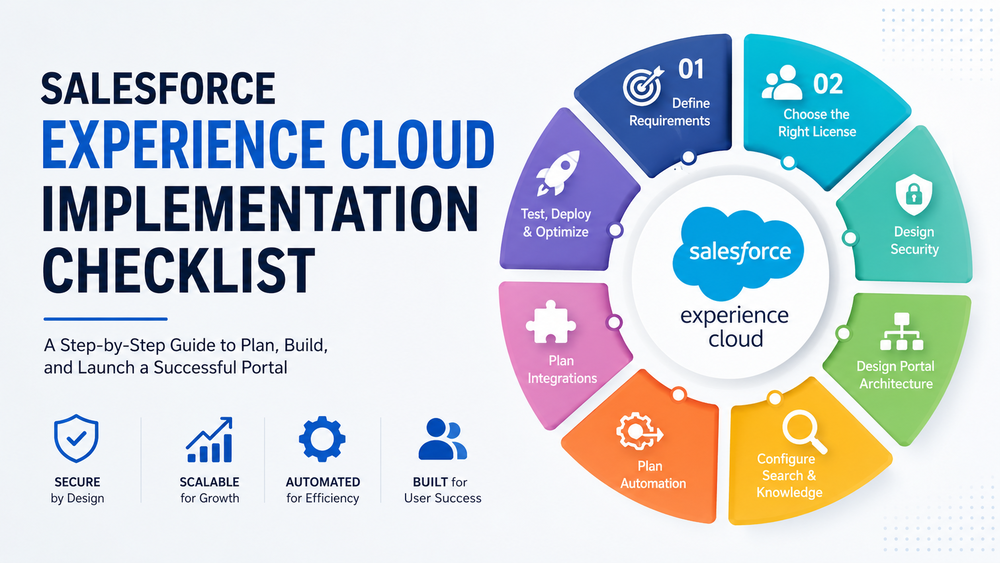
Salesforce Experience Cloud Implementation Checklist: Why It Matters
Experience Cloud implementations typically involve multiple business teams, external users, integrations, security requirements, and automation. Without a structured implementation plan, projects often become more expensive, take longer to deliver, and require significant rework after launch.
A structured implementation checklist helps organizations:
- define clear business objectives;
- reduce implementation risks;
- improve security from the beginning;
- simplify deployment;
- improve user adoption;
- build a portal that is easier to maintain and scale.
One of the most common implementation mistakes is opening Experience Builder before defining business requirements.
Successful Experience Cloud implementations begin with business goals—not portal pages.
Salesforce also recommends planning the overall portal architecture before configuration begins.
Salesforce Experience Cloud Implementation Checklist Phase 1 — Define Business Requirements
Every successful Experience Cloud project starts by understanding the business problem the portal is expected to solve.
Before creating pages or configuring users, clearly define the portal’s purpose.
Ask questions such as:
- What business problem will the portal solve?
- Who are the portal users?
- What tasks should they complete?
- Which Salesforce objects will they access?
- Which business processes should be automated?
- How will project success be measured?
Your implementation checklist should include:
- □ Define business goals.
- □ Identify user groups.
- □ Document business processes.
- □ Identify required Salesforce objects.
- □ Define user journeys.
- □ Establish KPIs and success metrics.
Typical business objectives include:
- reducing customer support requests;
- enabling partner collaboration;
- providing secure document sharing;
- allowing customers to manage Cases online;
- delivering self-service through Salesforce Knowledge.
Without well-defined business requirements, customization decisions become inconsistent, increasing implementation complexity and technical debt.
Phase 2 — Identify Stakeholders Early
Experience Cloud implementations require collaboration across both technical and business teams.
Clearly assigning ownership before development begins helps reduce delays, improve communication, and ensure business requirements remain aligned throughout the project.
Typical stakeholders include:
- Executive Sponsor
- Product Owner
- Salesforce Administrator
- Solution Architect
- Salesforce Developers
- UX Designer
- Business Representatives
- Customer Support Team
Each major requirement should have a clearly identified business owner responsible for validating implementation decisions.
Projects with well-defined ownership generally experience fewer change requests during development.
Phase 3 — Prepare Your Salesforce Environment
The quality of your portal depends directly on the quality of your Salesforce organization.
Before enabling Experience Cloud, review your CRM configuration to ensure that users, data, automation, and security are ready for external access.
Your preparation checklist should include:
- □ Remove duplicate records.
- □ Verify object relationships.
- □ Review validation rules.
- □ Review page layouts.
- □ Confirm record types.
- □ Review existing automation.
- □ Review Apex customizations.
- □ Verify data ownership.
Common issues discovered during this phase include:
- duplicate Contacts causing login confusion;
- inconsistent Account ownership affecting record visibility;
- outdated validation rules preventing portal users from completing actions;
- legacy automation creating unexpected behavior.
Investing time in CRM preparation significantly reduces implementation risks later in the project.
Phase 4 — Choose the Right Experience Cloud License
Licensing is one of the most important architectural decisions during an Experience Cloud implementation.
Selecting the wrong license can either increase costs unnecessarily or limit functionality required by your users.
Before implementation, evaluate:
- expected number of users;
- login frequency;
- required Salesforce objects;
- sharing requirements;
- expected business growth;
- future scalability.
Your licensing checklist should include:
- □ Estimate total users.
- □ Select the appropriate Experience Cloud license.
- □ Review available features.
- □ Estimate future growth.
- □ Validate licensing costs.
Choosing the appropriate licensing model early in the project helps avoid expensive redesigns after deployment.
For a detailed comparison of license types, read:
Salesforce Experience Cloud Licensing Explained: A Practical Guide
Salesforce Experience Cloud Implementation Checklist Phase 5 — Design Security
Security should guide every implementation decision—not be treated as a final deployment task.
Before creating portal pages, determine exactly which records, objects, and features each user group should be able to access.
Follow the principle of least privilege, granting users only the permissions necessary to perform their work.
Your security checklist should include:
- □ Configure Profiles.
- □ Configure Permission Sets.
- □ Configure Sharing Sets.
- □ Review Sharing Rules.
- □ Configure the External Sharing Model.
- □ Secure Guest User access.
- □ Review Multi-Factor Authentication requirements.
- □ Configure session security policies.
Designing the security model before development makes it much easier to validate permissions, test user access, and maintain compliance requirements.
For additional recommendations, see:
Salesforce Experience Cloud Security Best Practices
Phase 6 — Design Portal Architecture
Once business requirements, licensing, and security have been defined, the next step is designing the overall portal architecture.
Many projects spend too much time customizing pages before deciding how users will navigate the portal.
Instead, begin by designing the overall user experience and information architecture.
Your planning checklist should include:
- □ Define navigation menus.
- □ Design page hierarchy.
- □ Organize content logically.
- □ Define audience-specific experiences.
- □ Plan mobile responsiveness.
- □ Apply branding guidelines.
- □ Design for future scalability.
When reviewing the portal structure, consider questions such as:
- Which pages should users see first?
- How many clicks are required to complete common tasks?
- Where should users access support resources?
- Which information should appear immediately after login?
Avoid excessive customization unless there is a clear business requirement. Standard Experience Cloud components are easier to maintain, receive ongoing Salesforce improvements, and typically reduce long-term implementation costs.
A simple, intuitive portal architecture usually contributes more to user adoption than highly customized page designs.
Salesforce Experience Cloud Implementation Checklist Phase 7 — Configure Search and Knowledge
A portal is only valuable if users can quickly find the information they need.
Many Experience Cloud implementations focus heavily on page design while overlooking search configuration and Salesforce Knowledge. As a result, users struggle to locate answers, leading to lower portal adoption and increased support requests.
Before launching your portal, verify that search delivers relevant results and that your content is well organized.
Your checklist should include:
- □ Enable Salesforce Knowledge (if applicable).
- □ Configure Data Categories.
- □ Organize Knowledge articles into logical topics.
- □ Define article visibility.
- □ Configure search permissions.
- □ Review content ownership.
- □ Test search results for different user types.
A well-structured Knowledge Base improves the self-service experience and reduces the workload on support teams.
For additional setup recommendations, see the official Salesforce documentation
Salesforce Experience Cloud Implementation Checklist Phase 8 — Plan Automation
Automation should simplify portal processes—not introduce unnecessary complexity.
Before implementation, identify which business processes require automation and determine whether they should be implemented using Salesforce Flow or Apex.
Common Experience Cloud automation includes:
- Case creation;
- approval processes;
- notifications;
- onboarding workflows;
- document generation;
- task assignment;
- record synchronization.
Your automation checklist should include:
- □ Review existing automation.
- □ Design Record-Triggered Flows.
- □ Configure Scheduled Flows where appropriate.
- □ Implement Fault Paths.
- □ Reuse Subflows where practical.
- □ Use Apex only when declarative tools cannot meet the requirement.
Before introducing Apex, verify whether the requirement can be implemented using Record-Triggered Flows, Screen Flows, or other declarative automation tools. This approach generally improves maintainability and reduces development effort.
Avoid creating multiple automations that perform the same business function. Centralizing automation logic makes future enhancements significantly easier.
Related resources:
Salesforce Record-Triggered Flow Best Practices
Salesforce Flow Best Practices: 10 Tips for Better Automations
Phase 9 — Plan Integrations
Most Experience Cloud implementations connect Salesforce with external applications.
Typical integrations include:
- ERP systems;
- payment gateways;
- identity providers (SSO);
- document management platforms;
- marketing automation tools;
- REST APIs;
- middleware platforms.
Integration planning should begin before development starts.
Your checklist should include:
- □ Identify external systems.
- □ Define authentication methods.
- □ Review API limitations.
- □ Design error handling.
- □ Configure monitoring and logging.
- □ Validate integration security.
A well-designed integration strategy improves reliability, simplifies troubleshooting, and reduces future maintenance costs.
Salesforce Experience Cloud Implementation Checklist Phase 10 — Optimize for Performance and Scalability
A portal that performs well during testing may behave differently once hundreds or thousands of users begin accessing it.
Scalability should be considered from the beginning of the implementation.
Review:
- sharing calculations;
- Large Data Volumes (LDV);
- Lightning Web Component performance;
- Flow optimization;
- API usage;
- bulk operations;
- caching strategies;
- page load times.
Your checklist should include:
- □ Optimize Salesforce Flows.
- □ Minimize unnecessary queries.
- □ Review page performance.
- □ Test large data volumes.
- □ Validate API consumption.
- □ Review page load times.
- □ Plan for future growth.
Building for scalability from day one reduces the likelihood of future performance bottlenecks.
For additional guidance on Flow optimization, read:
Salesforce Flow Performance Optimization Guide
Phase 11 — Test Everything
Before deploying Experience Cloud to production, verify that every critical business process has been tested.
Testing should validate not only functionality but also security, integrations, performance, and accessibility.
Your testing checklist should include:
| Test Area | Status |
|---|---|
| Functional testing | □ |
| Security testing | □ |
| User Acceptance Testing (UAT) | □ |
| Mobile testing | □ |
| Browser compatibility | □ |
| Accessibility testing | □ |
| Search functionality | □ |
| Integration testing | □ |
| Performance testing | □ |
Testing with multiple user profiles ensures that permissions, sharing rules, and visibility settings behave exactly as expected.
Phase 12 — Prepare for Go-Live
A successful deployment requires more than moving metadata into production.
Before launch, confirm that your deployment strategy has been fully reviewed.
Your checklist should include:
- □ Validate production deployment.
- □ Create backups.
- □ Prepare a rollback plan.
- □ Train administrators.
- □ Train business users.
- □ Publish documentation.
- □ Configure monitoring.
- □ Review analytics.
A documented rollback strategy helps minimize business disruption if unexpected issues arise after deployment.
Phase 13 — Monitor and Improve After Go-Live
Launching the portal is the beginning—not the end—of the implementation lifecycle.
Continuous monitoring helps identify improvement opportunities and ensures the portal continues to meet evolving business requirements.
After launch, regularly review:
- user adoption;
- portal analytics;
- search behavior;
- support requests;
- Flow performance;
- security events;
- enhancement requests.
Your post-launch checklist should include:
- □ Monitor user adoption.
- □ Collect user feedback.
- □ Review analytics.
- □ Monitor performance.
- □ Perform periodic security reviews.
- □ Optimize automation.
- □ Plan future enhancements.
Continuous optimization helps maximize the long-term value of your Experience Cloud investment.
Common Experience Cloud Implementation Mistakes
Many implementation challenges can be avoided through careful planning.
The most common mistakes include:
- starting with page design instead of business requirements;
- selecting the wrong Experience Cloud license;
- underestimating security requirements;
- over-customizing standard functionality;
- ignoring mobile users;
- failing to configure search properly;
- not testing integrations thoroughly;
- deploying without a rollback plan;
- providing insufficient user training;
- failing to establish long-term governance and ownership.
Addressing these issues early significantly improves implementation success.
Salesforce Experience Cloud Implementation Checklist
Planning
- □ Business goals defined.
- □ User personas identified.
- □ Business processes documented.
- □ Success metrics established.
Salesforce Preparation
- □ Data quality reviewed.
- □ Duplicate records removed.
- □ Existing automation reviewed.
Licensing
- □ License model selected.
- □ User growth estimated.
- □ Budget validated.
Security
- □ Profiles configured.
- □ Permission Sets reviewed.
- □ Sharing Rules validated.
- □ Guest User access secured.
- □ MFA requirements reviewed.
Portal Architecture
- □ Navigation completed.
- □ Page hierarchy finalized.
- □ Branding applied.
- □ Mobile responsiveness verified.
Search and Knowledge
- □ Search configured.
- □ Knowledge visibility reviewed.
- □ Content categorized.
Automation
- □ Flows tested.
- □ Fault Paths implemented.
- □ Notifications validated.
Integrations
- □ APIs tested.
- □ Authentication verified.
- □ Error handling validated.
Testing
- □ Functional testing completed.
- □ Security testing completed.
- □ UAT approved.
- □ Performance validated.
Deployment
- □ Backup completed.
- □ Rollback plan documented.
- □ Monitoring enabled.
- □ Documentation published.
How Success Craft Can Help
Implementing Salesforce Experience Cloud successfully requires more than configuring portal pages. It requires careful planning, secure architecture, scalable automation, reliable integrations, and ongoing governance.
Success Craft helps organizations design, implement, and optimize Experience Cloud solutions that are secure, scalable, and aligned with business objectives.
Our team can help with:
- Experience Cloud implementation;
- portal architecture and UX planning;
- security model design;
- Salesforce integrations;
- Flow automation;
- performance optimization;
- post-launch support and continuous improvement.
Related resources:
- Salesforce Experience Cloud Licensing Explained
- Salesforce Experience Cloud Security Best Practices
- Salesforce Experience Cloud Limitations Before Building a Portal
- Salesforce Experience Cloud vs Custom Portal
- Salesforce Consulting Services
- Contact Us
Conclusion
A successful Salesforce Experience Cloud implementation begins long before the first portal page is created. The most effective projects are driven by clear business objectives, a well-designed security model, scalable architecture, and thorough testing.
Rather than treating implementation as a one-time deployment, organizations should view it as an ongoing process of optimization and governance. Monitoring adoption, collecting feedback, reviewing security, and continuously improving automation ensure that the portal continues to support changing business needs.
By following this Salesforce Experience Cloud Implementation Checklist, organizations can reduce implementation risks, improve user adoption, strengthen security, simplify maintenance, and build customer and partner portals that continue to deliver value as business requirements evolve.
What is a Salesforce Experience Cloud implementation checklist?
A Salesforce Experience Cloud implementation checklist is a step-by-step guide that helps organizations plan, build, secure, test, deploy, and maintain customer, partner, or employee portals while reducing implementation risks.
What should be included in an Experience Cloud implementation checklist?
A complete implementation checklist should include business requirements, stakeholder planning, Salesforce environment preparation, licensing, security, portal architecture, automation, integrations, testing, deployment, and post-launch optimization.
What are the most common Experience Cloud implementation mistakes?
Common mistakes include selecting the wrong license, designing security too late, over-customizing standard components, ignoring mobile users, skipping user acceptance testing, and deploying without a rollback plan.
How long does a Salesforce Experience Cloud implementation take?
Implementation time depends on project complexity, customization, integrations, and business requirements. Small portals may be delivered within a few weeks, while enterprise implementations often require several months.
Should I customize Experience Cloud or use standard components?
Start with standard Experience Cloud components whenever possible. Introduce custom development only when standard functionality cannot meet specific business requirements.
How can I ensure a successful Experience Cloud implementation?
Define business objectives before development, design security early, prepare Salesforce data, optimize automation, thoroughly test the solution, and continuously monitor adoption and performance after go-live.
Is Experience Cloud suitable for both customer and partner portals?
Yes. Salesforce Experience Cloud supports customer portals, partner portals, employee portals, self-service sites, knowledge portals, and other external digital experiences using the same platform with different licensing and security models.